WP Event Manager and Events Manager are two of the most popular event management plugins for WordPress. If you are exploring alternatives to Events Manager, this comparison will help you see how the two plugins differ.
WP Event Manager is built around a free, lightweight core plugin. When an event needs more, such as ticket sales or Zoom sessions, you add the right feature from more than 40 premium add-ons. It includes 28 event themes and a check-in app for Android and iOS, and it’s used by over 30,000 organizers to run their events. In the following comparison, we will go over the features, performance, themes, support, developer tools, SEO and pricing of the two plugins and see where WP Event Manager has the edge.
Events Manager vs WP Event Manager: Introduction
Event Manager is a WordPress plugin to create, manage and book events. Its free version on WordPress.org covers calendars, event lists, recurring events, locations with Google Maps and basic bookings. Online payments, custom booking forms, coupons, PDF tickets, and QR check-in come with Events Manager Pro, a paid yearly plan.
WP Event Manager is a WordPress event management plugin made by a team that works only on event software. Install the free plugin and you’ll already have event listings, search filters, a form for organizers to submit events, separate pages for organizers and venues, and a dashboard where organizers look after their events.
Need something more later? Choose the add-on that you want for it, such as Calendar, Recurring Events, Sell Tickets, Registrations, Zoom or HubSpot CRM. So there’s no big plan to buy just to get one feature.
Events Manager vs WP Event Manager: Quick Comparison
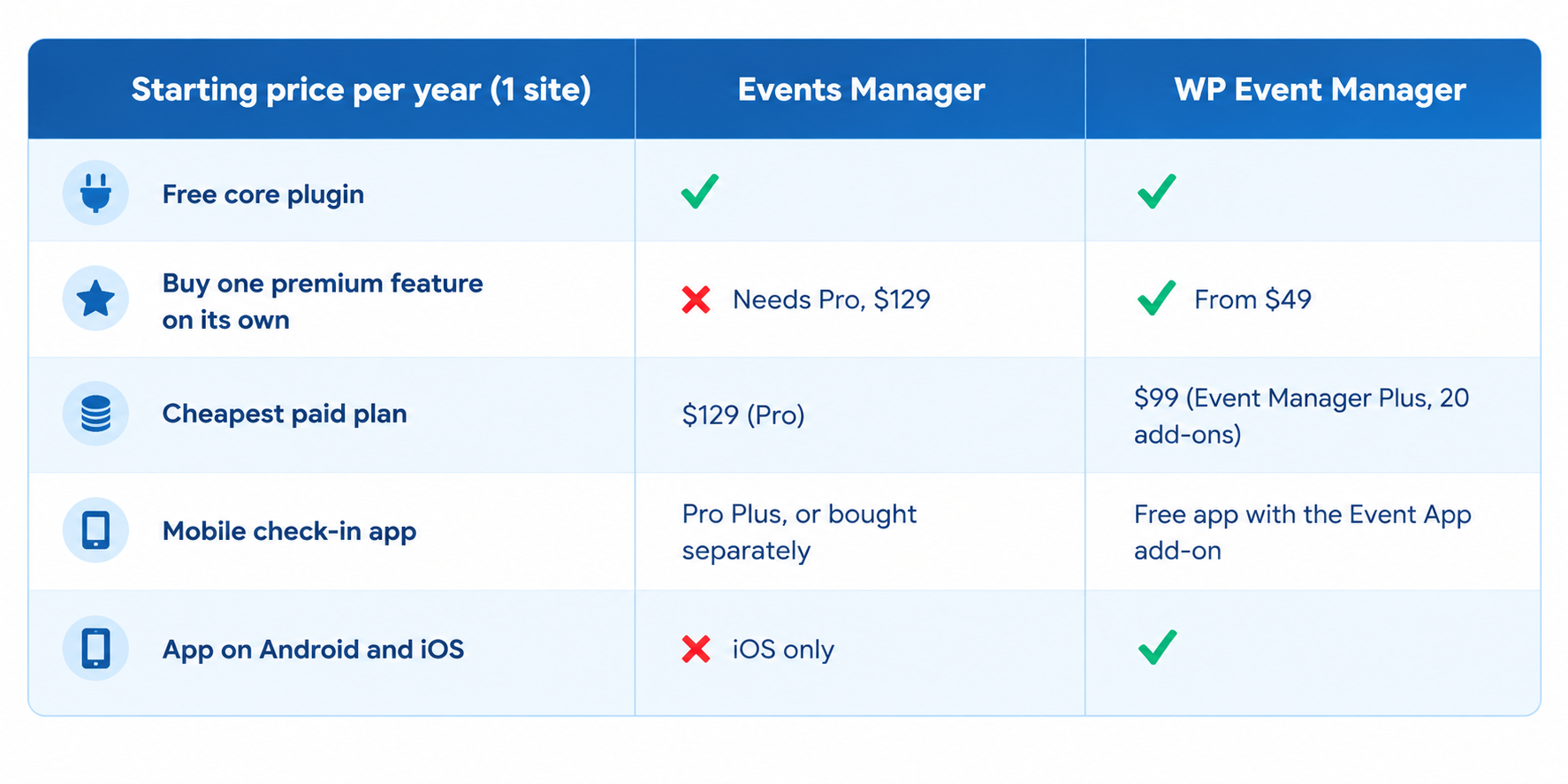
- You can start with either plugin for free and pay later for extras. With Events Manager, most paid features sit inside one Pro plan, so you buy the whole plan even if all you want is online payments. WP Event Manager sells each feature as its own add-on, starting at $49 a year.
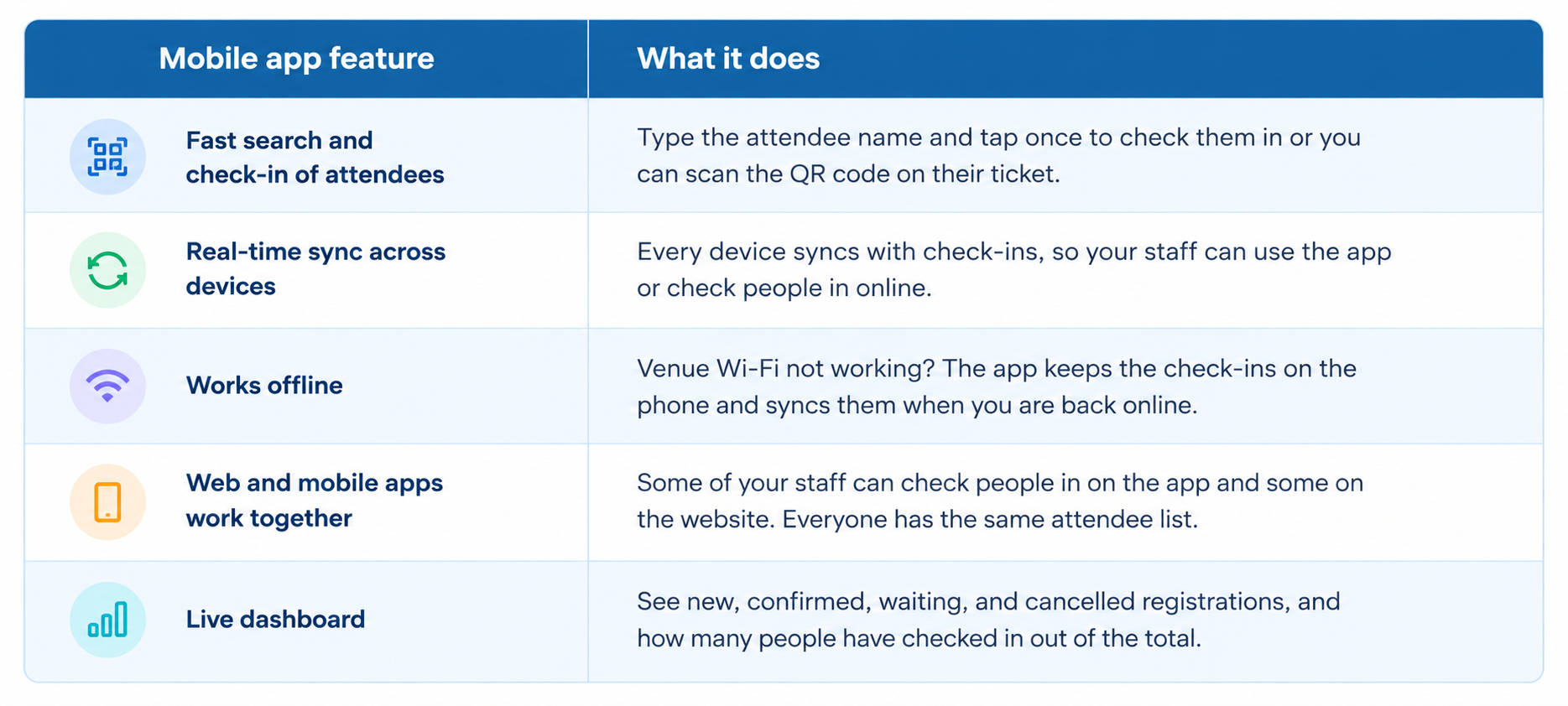
- WP Event Manager’s mobile app is free to download on both Android and iOS, and it connects to your site through the Event App add-on. Events Manager’s app is only on iOS for now, with Android listed as coming soon, and it’s free only on the Pro Plus plan. Watch the video below to see the WP Event Manager app at work.
What Does the WP Event Manager Mobile App Offer?
- Events pages should be customized to match your brand, and both plugins provide options for adjusting the look.
- Events Manager leans towards developers. A lot of its layout runs on placeholders and formatting settings, which gives a developer plenty of control but takes a beginner a while to learn.
- WP Event Manager is easier to change. override its templates in your theme, add or delete form fields with the field editor and build pages with Gutenberg, Elementor, or VisualComposer. Or if you’d rather not deal with code at all, the team also offers customization services.
Events Manager vs WP Event Manager: Performance
Performance is about page speed, the server memory a plugin eats up, and whether visitors find your site smooth or sluggish. Much of that depends on how much code a plugin runs on each page.
WP Event Manager’s free core handles listings, search, the submission form and the dashboards, and not much else. The calendar, maps, tickets, and integrations are separate add-ons, so a site that only lists events never loads any ticketing code.
Events Manager’s main plugin comes with bookings, calendars, maps, timeslots and booking stats all built in. You can check this on your own site. Make a staging copy, add a few events to it, then run the event pages through Query Monitor or Google PageSpeed Insights.
Events Manager vs WP Event Manager: Features
Both plugins have useful features in their free and paid versions. Here’s where WP Event Manager gives you more:
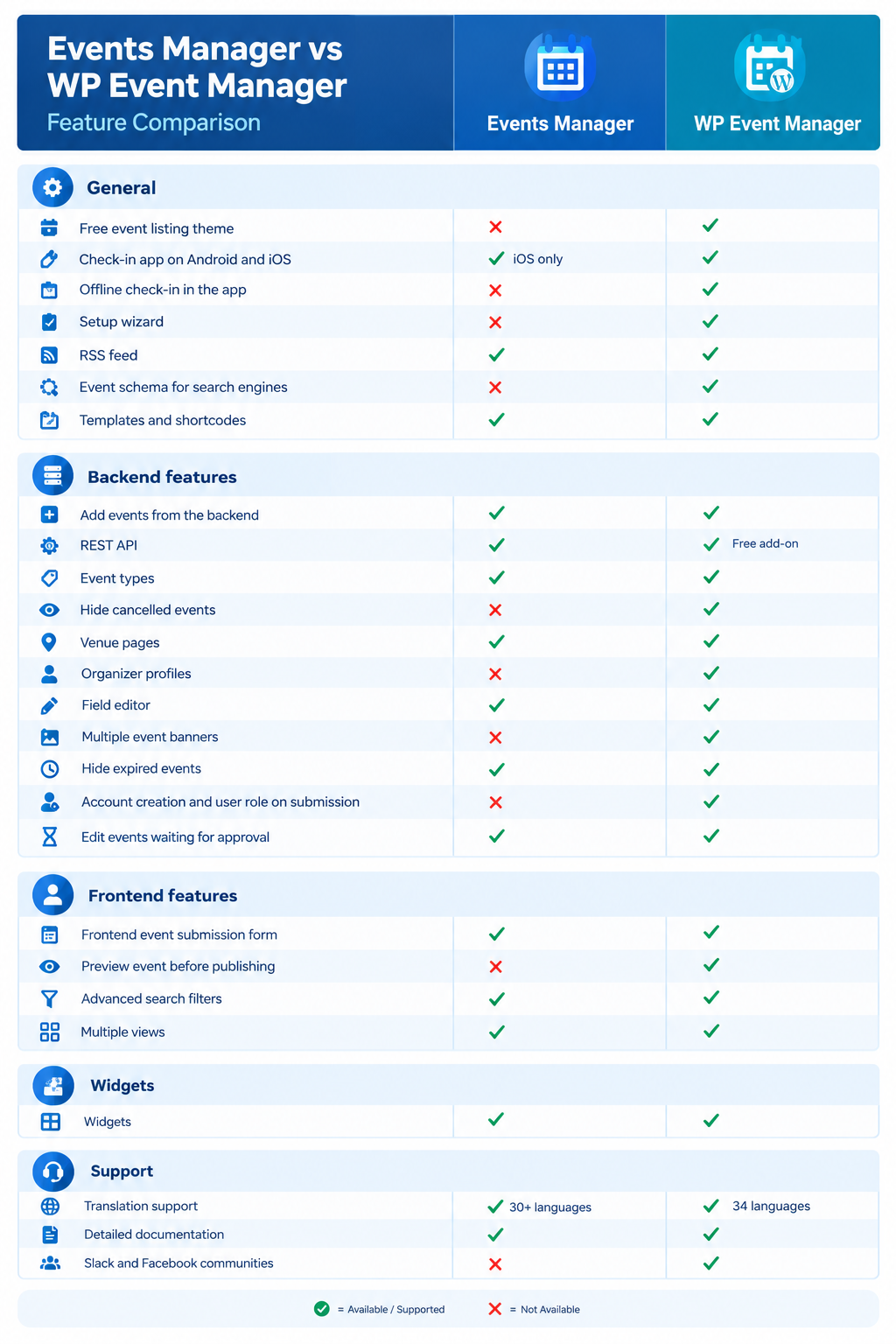
- The free WP Event Manager plugin has things Events Manager doesn’t list at all, like a preview before an event goes live, the option to hide cancelled events, multiple banners per event, organizer profiles and a setup wizard.
- WP Event Manager’s check-in app runs on Android and iOS and keeps working offline. Events Manager’s app is on iOS only for now.
- Both plugins let organizers submit events from the front end of your site. WP Event Manager can even create an account for the event organizer and assign them a user role at the time of submission.
- For online and hybrid events, WP Event Manager has three add-ons: Zoom, Speaker and Schedule and Expo Networking. Events Manager supports online events too, mainly through a link added to the event page or its Zoom add-on.
Events Manager vs WP Event Manager: Feature Comparison Table
Events Manager vs WP Event Manager: Themes
Your theme decides how visitors see your events and your brand. Events Manager doesn’t make event themes. It’s built to work with standard WordPress and BuddyPress themes, so finding one and styling it for events is up to you.
WP Event Manager has 28 event themes made to work with its add-ons, plus a free Event Listing theme on WordPress.org. With them you get:
- Designs for live and online events such as Conference, Expo, Festival, Webinar, and Online Class
- Themes for niche events too, from weddings and charity drives to soccer clubs and running events
- WP Event Manager add-ons made layouts, so tickets, calendars and registrations fit right in
- A live preview of every theme before you buy
Events Manager vs WP Event Manager: Support
Good support saves you hours of panic when something breaks the night before an event. Events Manager offers:
- Documentation
- Tutorials
- FAQs
- Troubleshooting tips
- Pro support forums, for Pro users
- Community forums on WordPress.org, for free users
WP Event Manager gives you more ways to get help, and it covers the free plugin, the add-ons and the themes:
- A knowledge base and FAQs
- Guides on the blog
- Video tutorials on the YouTube channel
- Slack and Facebook communities where you can ask other users and the team
- Support tickets with the WP Event Manager team
With the free plugin, anyone can access the knowledge base, FAQs, blog, videos and communities. When you buy an add-on or a theme, you also get support tickets. Someone from the team will work through your problem with you.
Events Manager vs WP Event Manager: Developer Friendliness
Events Manager is built with developers in mind. It has hundreds of hooks, a REST API, and placeholder-based formatting, which is great if you write code and harder to pick up if you don’t.
WP Event Manager works for both kinds of users. Developers get template overrides, hooks, shortcodes and a free Rest API add-on, plus a developers resources section in the knowledge base. If you don’t code, that’s fine too. Most options are included in the settings of the plugin and layouts can be changed in Gutenberg, Elementor, or Visual Composer.
Events Manager vs WP Event Manager: Which One Helps Your SEO More?
For an event to display correctly in Google, search engines must know what it is, the date, and the venue. WP Event Manager automatically adds event schema to each event page, so you don’t have to set anything up and Google can read the details. Events Manager mentions that it works with SEO plugins. We didn’t find built-in event schema anywhere on its pages, though.
WP Event Manager also sorts events into types and categories, for example a workshop under Business. With the Event Tags add-on, you can tag events as well, which links similar events together for visitors and search engines alike.
Events Manager vs WP Event Manager: Pricing
The Events Manager core plugin is free. For payments, custom forms, coupons, PDF tickets, and check-in, you need Events Manager Pro, billed yearly. These are its regular prices, before any sale discount:
- $129 for 1 site
- $219 for 3 sites
- $299 for 5 sites
- $499 for 10 sites
- $599 for unlimited sites
The mobile app costs extra on top of Pro, unless you move up to the Pro Plus plan.
WP Event Manager’s pricing suits businesses of every size. The core plugin is free, stand-alone add-ons start at $49/year and the bundles cost this much per year for a single site:
- Event Manager Plus: $99, with 20 add-ons
- Event Manager Pro: $199, with 27 add-ons
- Virtual Event Manager Pro: $299, with 30 add-ons
- All Events Manager Pro: $399, with every add-on
Themes cost from $49. You’ll find the full price on each theme’s page. Your WP Event Manager plugins will keep working even when your license expires. You get no updates and no support until you renew. Check the latest prices on the pricing page.
Take Control of Your Events with WP Event Manager
For an events site that’s simple to set up and can grow as your events do, WP Event Manager is the one we’d go with. The core costs nothing, and you only buy add-ons when you need them. On top of that, there are 28 event themes, a check-in app that runs on Android and iOS, and a support team on tickets, Slack, and Facebook. Get the free plugin from WordPress.org, test any add-on on the live demo, then add the ones your events actually call for.
FAQs
1. Is WP Event Manager better than Events Manager?
For most organizers, it is. With WP Event Manager’s free core you already get organizer profiles, event preview and a setup wizard. Paid features come one add-on at a time, so there’s no full Pro plan to buy.
2. Which is cheaper, Events Manager or WP Event Manager?
WP Event Manager’s single add-ons start at $49 a year, and its smallest bundle costs $99 a year with 20 add-ons. Events Manager Pro starts at $129 a year for one site at its regular price.
3. Do both plugins come with a mobile check-in app?
They do, but WP Event Manager’s app runs on both Android and iOS and keeps working offline. Events Manager’s app is only on iOS for now, and it’s free only with the Pro Plus plan.
4. Is WP Event Manager or Events Manager better for online and hybrid events?
WP Event Manager has more to offer here, with add-ons for Zoom, Speaker and Schedule, and Expo Networking. Events Manager lets you add an online event link and has a Zoom add-on, though we couldn’t find speaker profiles or virtual networking on its pages.
5. Do Events Manager and WP Event Manager offer event themes?
WP Event Manager has 28 event themes built for its add-ons, plus a free Event Listing theme on WordPress.org. Events Manager doesn’t make themes, so you’ll need to choose and style a standard WordPress theme yourself.
The post Events Manager vs WP Event Manager: Which Is Better? appeared first on WP Event Manager.


0 Commentaires