Looking at Eventin vs WP Event Manager for your event website? Both plugins list events, sell tickets and take registrations on WordPress, so that part is covered either way. Where they differ is what happens later, when you’ve got hundreds of attendees to check in, contacts to send to your CRM, and a site that needs a theme made for events.
Below, the two plugins are compared on features, ticket selling, check-in, marketing tools, virtual events, themes, support and pricing. If you’re looking for an Eventin alternative, this comparison covers what you need to know.
Eventin vs WP Event Manager: Overview
What is Eventin?
Eventin comes from Themewinter, though its WordPress.org listing carries the Arraytics name. The free plugin has event pages and calendar views. It can also sell tickets through WooCommerce, Stripe or PayPal and add a Zoom or Google Meet link to an event. Eventin Pro is sold as one package with AI content generation, a landing page builder, ticket and certificate builders, a seat map and QR ticket validation. Themewinter says more than 18,000 event organisers use it.
What is WP Event Manager?
WP Event Manager is a free event management plugin you can install from WordPress.org. The team behind it has been making event software for over nine years. In the free version, you get event listings with search filters, a form for submitting events from the front end, organiser and venue pages, and a dashboard for organisers.
For more features, there are 42 premium addons. They’re split into feature, ticket selling, marketing, and virtual event add-ons. There’s also a dedicated event check-in app for Android and iOS and 28 event themes. More than 30,000 organisers run their events on WP Event Manager today.
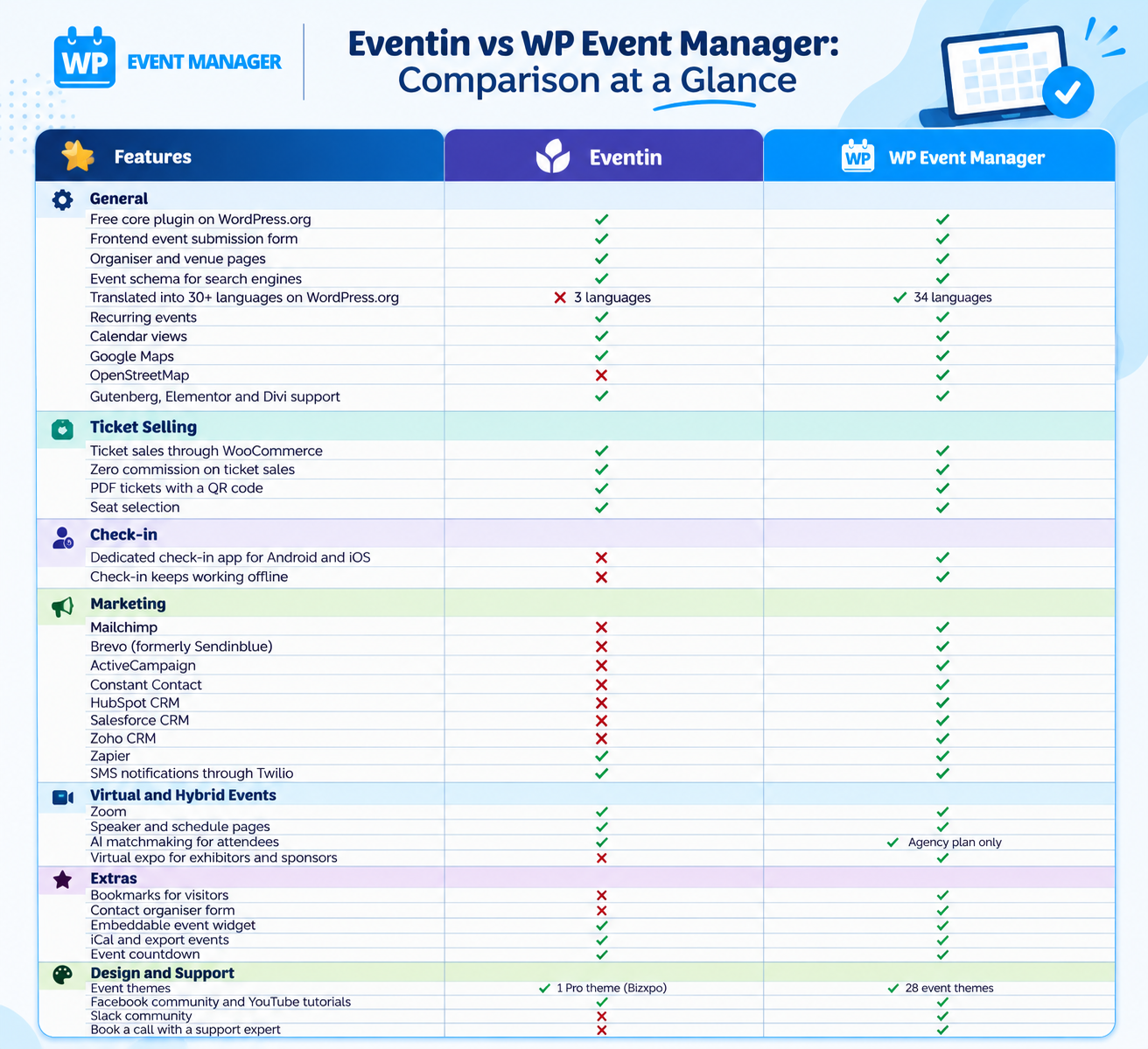
Eventin vs WP Event Manager: Comparison at a Glance
Which Plugin Gives You More Features?
Eventin puts most of its tools into one plugin and one Pro package.
WP Event Manager works the other way: a free core, then add-ons you switch on as your events need them. That difference shows up quickly once you look past the basics.
- With 42 add-ons, WP Event Manager covers jobs Eventin’s pages don’t mention at all, such as guest lists, name badges, bookmarks for visitors and a contact organiser form.
- Running an event directory where other people post events? WP Event Manager can charge them for each listing with Woocommerce paid listing, and Stripe Split Payment
sends each organiser their share of ticket sales. - It’s translated into 34 languages on WordPress.org. Eventin’s listing shows three.
- Prefer open map data to Google? There’s an OpenStreetMap add-on alongside the Google Maps one.
Every organiser on a WP Event Manager site has their own frontend dashboard for adding, editing and tracking events, and admins can approve submissions from the backend.
Which Plugin Sells Event Tickets Better?
On both, ticket sales can run through WooCommerce with no commission taken, and buyers get a PDF ticket carrying a QR code. Eventin’s multivendor setup depends on Dokan, a separate marketplace plugin. The gap is in how much control you get around the sale.
WP Event Manager’s Sell Tickets add-on handles paid, free and donation tickets, and since it runs on WooCommerce you can take payments through 100+ gateways. Next to it you’ve got Registrations for free events, Attendee Information for custom questions at checkout, WP Seats for seat selection and Event Countdown to push early sales. Each one is a separate add-on, so a free community meetup doesn’t need to carry a ticketing code it’ll never use.
For marketplace sites, WP Event Manager is the stronger fit. It splits payments with organisers through Stripe and lets you charge for listings, all from its own add-ons.
Which Plugin Has the Better Check-in App?
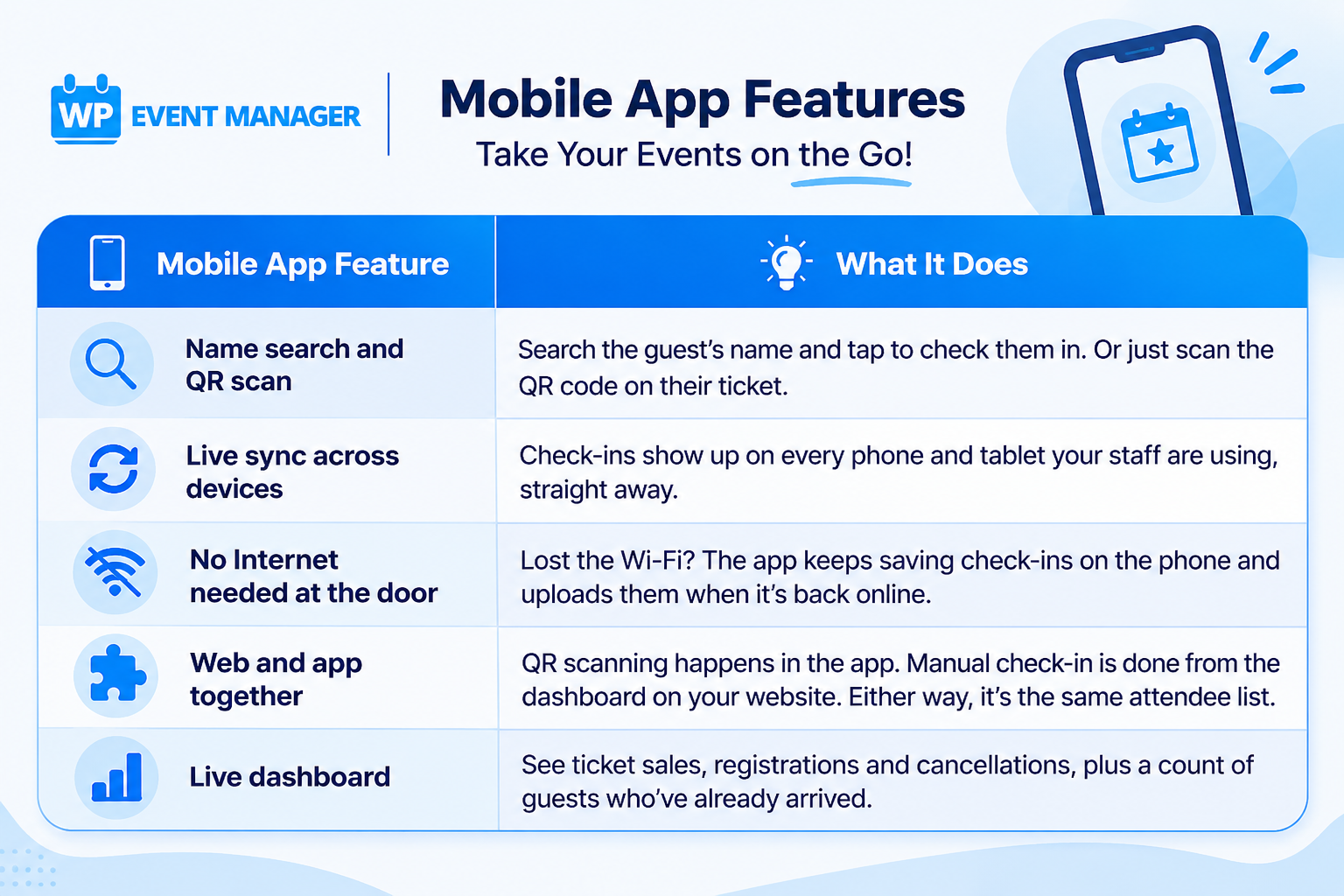
This is one of the clearest differences between the two. Eventin doesn’t have its own mobile app. Its documentation says check-in runs from the Ticket Scanner in the WordPress admin, or from a smartphone browser, and that any scanning app for Android or iOS can read the tickets. QR ticket validation also needs Eventin Pro.
WP Event Manager has a dedicated event check-in app on Google Play and the App Store, connected through the Event App add-on. It’s built for the door of a busy venue, not just for scanning.
Which Plugin Connects With More Marketing Tools?
Eventin’s site mentions FluentCRM, MailPoet, Zapier, Make, n8n, Pabbly Connect and Twilio by name. That’s fine when your email lists already sit inside WordPress. For anything outside it, you’d be setting up an automation tool to pass the data across.
WP Event Manager has its own add-on for Mailchimp, Brevo, ActiveCampaign, Constant Contact, Hubspot CRM, Salesforce CRM and Zoho CRM. So attendee details land in your mailing list or CRM on their own, with no extra tool in between. Want texts too? There are SMS notification via Twilio, Zapier for the apps we don’t cover, and if you’d like to change the emails people receive, there’s the Emails add-on.
Which Plugin Should You Use for Virtual and Hybrid Events?
Both let you put a Zoom link on an event page and show who’s speaking and when. Eventin includes Google Meet too, and its AI matchmaking comes only with the Agency plan.
WP Event Manager has three add-ons just for online and hybrid events. The Zoom add-on means you can create meetings and manage them from inside WordPress. Speaker and Schedule builds speaker profiles and session timings. Expo Networking sets up a virtual expo where attendees can meet exhibitors and sponsors, which Eventin doesn’t list. AI matchmaking is part of the Registrations add-on, and you can turn it on event by event, whichever licence you’re on.
Which Plugin Is Lighter on Your Site?
Eventin ships most of its features inside the main plugin. The free version already includes calendar views, ticketing, Zoom and Google Meet, and 10+ Elementor widgets, and Pro adds the AI tools, page and ticket builders, and the seat map on top.
WP Event Manager is built to stay light. Out of the box, the free core covers just listings, search, the submission form, and the organiser dashboard. Calendars, maps, tickets, and CRM sync are all add-ons you install separately. If you don’t switch one on, its code doesn’t load on your site.
That’s why we call it a lightweight event plugin. If you’d like to see it for yourself, install both on a staging copy of your site, add a few sample events and compare the event pages in Query Monitor or Google PageSpeed Insights.
Which Plugin Offers Better Event Themes?
Eventin Pro includes one event theme, Bizxpo. Themewinter’s larger bundles add more of its themes, but those cover other plugins and uses as well.
WP Event Manager has 28 WordPress event themes, and every one of them is made for event websites and works with its add-ons. There are designs for conferences, expos, festivals, webinars, and online classes, plus a few for things like charity drives and sports clubs. They all work with WooCommerce for ticket sales. You can also open a live preview of any theme before buying it.
You can try the plugin itself first, too. The live demo shows 7 event listing views and 7 calendar views.
Which Plugin Has Better Customer Support?
On Eventin’s site, you’ll find support tickets, docs, an FAQ, YouTube videos, and a Facebook group.
WP Event Manager has those too, plus a couple of extras:
- A knowledge base with FAQs and developer resources.
- Video tutorials on YouTube.
- Slack and Facebook communities where you can talk to other users and the team.
- Support tickets with the WP Event Manager team for add-on and theme customers.
- The option to book a call with a support expert.
You don’t need a licence for the knowledge base, the videos, or the communities. Free users can use them too.
Is WP Event Manager or Eventin Better Value?
Eventin Pro comes as one package. You pay for all of it, even the parts you’ll never use. Its pricing page currently shows these yearly plans, each with a sale price next to the regular one:
- Standard, for 2 sites, at $69 (regular price $99).
- Premium, for up to 10 sites, at $139 (regular price $399).
- Agency, for unlimited sites, at $239 (regular price $599).
The pricing page doesn’t list an end date for these sale prices.
WP Event Manager pricing lets you start small and only pay for what your events use. The core plugin is free, a single add-on costs $49 a year, and the bundles cost this much a year for one site:
- Event Manager Plus is $99, with 20 add-ons for displaying and managing events.
- Event Manager Pro costs $199 and adds ticket selling, for 27 add-ons in total.
- Virtual Event Manager Pro, at $299, brings 30 add-ons, Zoom included.
- All Events Manager Pro gives you every add-on for $399.
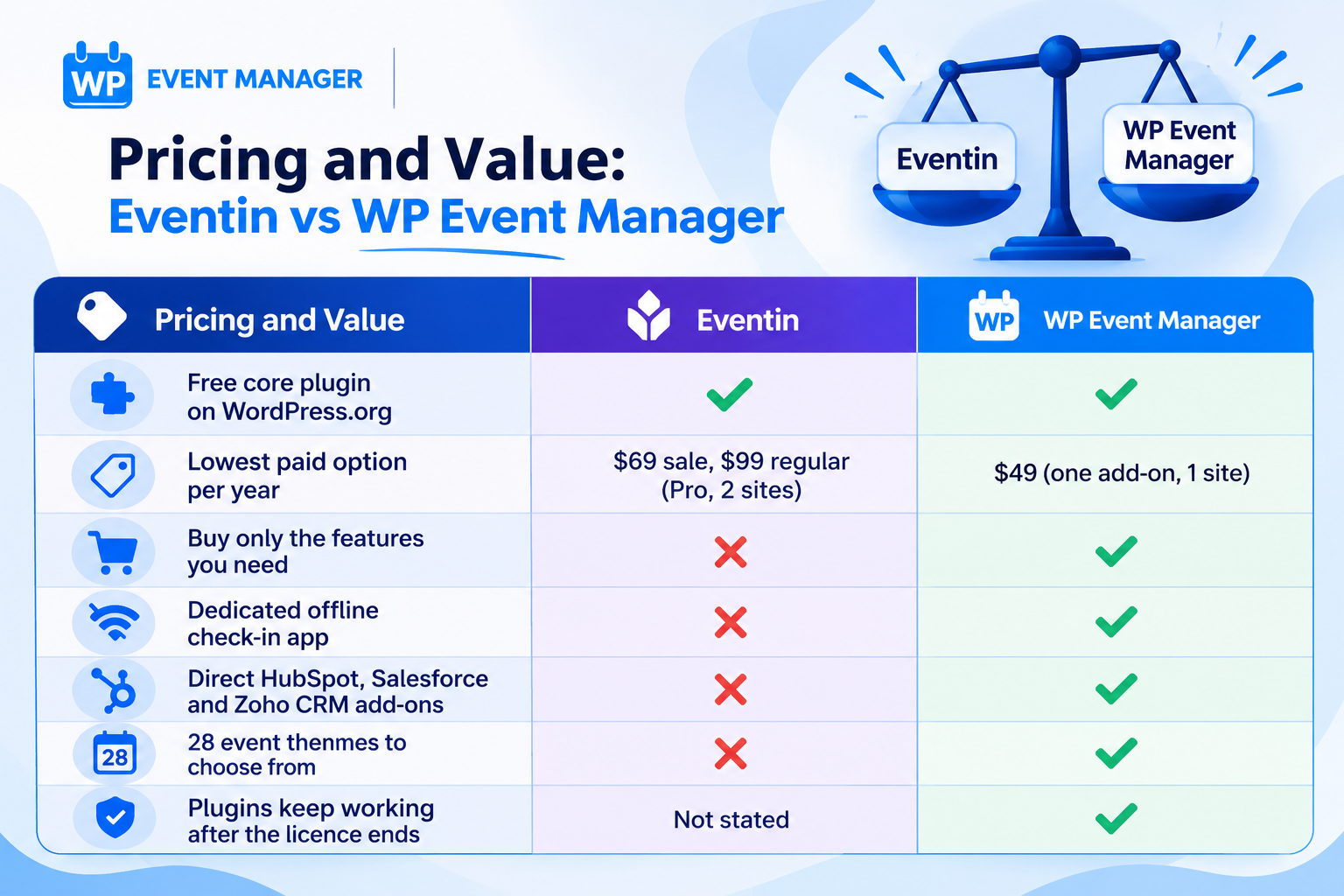
If your WP Event Manager licence runs out, your plugins keep working. You’d only stop getting updates and support until you renew. And before you spend anything, you can try every add-on on the Live Demo.
Why Choose WP Event Manager Over Eventin?
WP Event Manager has been recognised with several awards, including the SME Business Award 2024, The WP Awards 2023 and a Monster’s Award in 2023. The plugin has been downloaded more than a million times, and over 30,000 organisers use it today.
You can see the results on real sites too. Danschool Wesseling, a dance school, used the Recurring Events add-on to stop re-entering its weekly classes by hand. Phillip Dane, founder of Vintage Land, has also shared how WP Event Manager helped grow his events business.
Here’s what you get with WP Event Manager:
- A free core on WordPress.org that you can grow one add-on at a time.
- More than 40 add-ons to pick from, including Calendar, Sell Tickets, HubSpot CRM and Expo Networking.
- An Android and iOS app for check-in, which still works if the Wi-Fi goes down.
- 28 themes made only for event websites.
- Zero commission on every ticket you sell.
Wrapping Up: Eventin or WP Event Manager?
Eventin sells all of its paid features in one Pro licence. That’s handy if you want everything at once. But if you’d like to add features as you need them, check guests in with a phone app, send attendee data to Mailchimp, HubSpot or Salesforce, and use one of 28 event themes, WP Event Manager is the better fit.
You can get the free plugin from WordPress.org today and try the add-ons on our live demo. Then buy only the ones you’ll actually use. If you’ve got questions along the way, our team is there on Slack, Facebook, support tickets, or a call.
FAQs
Is WP Event Manager a good alternative to Eventin?
Yes, and for most organizers, it’s the better one. It has more add-ons than Eventin, its own check-in app that works offline, and direct links to CRMs like HubSpot and Salesforce. On top of that, you only pay for the add-ons you install.
Which plugin has a mobile app for checking in attendees, Eventin or WP Event Manager?
WP Event Manager does, with its own app on Android and iOS. Eventin doesn’t have one, so you check people in from the WordPress admin or a phone’s browser, and scanning QR codes needs Eventin Pro.
Is WP Event Manager cheaper than Eventin?
It is if you’re starting small. The core plugin costs nothing, and a single add-on is $49 a year. Eventin Pro’s yearly plans run from $99 to $599 at regular prices, and you buy the full package even if you need one feature.
Do Eventin and WP Event Manager charge commission on ticket sales?
Neither plugin takes a commission. WP Event Manager’s Sell Tickets add-on runs on WooCommerce, so you can also choose from more than 100 payment gateways.
Is WP Event Manager or Eventin better for virtual events?
WP Event Manager offers more for online and hybrid events, with add-ons for Zoom, Speaker and Schedule, and Expo Networking. Its AI matchmaking comes with the Registrations add-on, while Eventin keeps matchmaking for its Agency plan.
The post Eventin vs WP Event Manager: A Detailed Comparison for WordPress Event Sites appeared first on WP Event Manager.


0 Commentaires