Did you know that more than 43% of event planners consider event registration and attendee management as the most challenging areas of event management? There is no doubt that the way you manage your event registration can make or break your event’s success. Whether you host a small webinar or a large scale business conference or musical concert, your registration system directly influences your event attendance rate, conversion, and their experience.
One of the biggest advantages for WordPress users is the availability of a wide range of WordPress plugins and tools that allow you to create a feature packed event registration system on your website.
Read this article, you will discover how to manage event registrations in WordPress and the WordPress event registration tools that you can use to streamline the process.
Registration is not just a form
For many event organizers, the registration system revolves around the registration form, which is a misconception. As an event organizer, you must keep in mind that registration is the first step through which attendees interact with your event. So the process needs to be smooth and hassle-free
A convenient registration system passes through the following steps:
- Easy discovery: This step determines how easily your website visitors can find the registration form.
- Registration process for attendees: Here the attendees completes the registration process by filling up the registration form. The form needs to be small, simple and to the point. Adding too many fields makes the form lengthy and tedious for attendees to complete.
- Payments: A secure payment structure for paid registration is an absolute necessity to gain the confidence of your audiences.
- Confirmation: Don’t keep your attendees in doubt. A confirmation message to your attendees is a must.
- Attendee management: Manage your attendee data better with a systematic registration process and deliver personalized event experience based on that.
Managing event registration in WordPress
WordPress is an ideal choice for events websites as it is beginner-friendly, open source, and offers robust customization options to users. Managing your event registration through WordPress website empowers your system with an endless number of useful features.

It allows you to have a dedicated customizable event registration form that makes the entire process easy and straight-forward for you and your attendees. A WordPress plugin like WP Event Manager can be the best choice for you in this regard. The Registration add-on from WP Event Manager comes with a lot of features that not only strengthen your registration system but also boost networking through AI.
Some of the main features of the WP Event Manager Registration add-on include:
- Customizable registration forms.
- AI powered event matchmaking.
- Real time registration status updates through emails.
- Full admin control.
- My registration dashboard for attendees.
- Detailed registration dashboard for admins.
To get the full list of registration add-on features, discover the plugin now!
If you want to do your own research on WordPress registration plugins, you must know the essential features that a registration form must have.
Let us find them out in our upcoming segment.
9 Things Your Event Registration Should Have
When you create a WordPress event registration form, make sure you choose a plugin that allows you to add the following features to it.
- An easy to use interface to make it easy and accessible to all your attendees.
- Mobile friendly designs for better user experience.
- Customizable registration fields so that event organizers can get the exact information they want from their attendees and make the process fast and simple for attendees.
- Integration with secured payment gateway for a smooth and reliable ticket purchasing experience.
- Automated and real time registration notification.
- Networking opportunities for event attendees.
- Seamless integration with CRM plugins for improved marketing system.
- Reports and analytics to improve future registrations.
The Registration add-on from wp event manager offers all the above mentioned facilities to users ensuring a seamless experience.
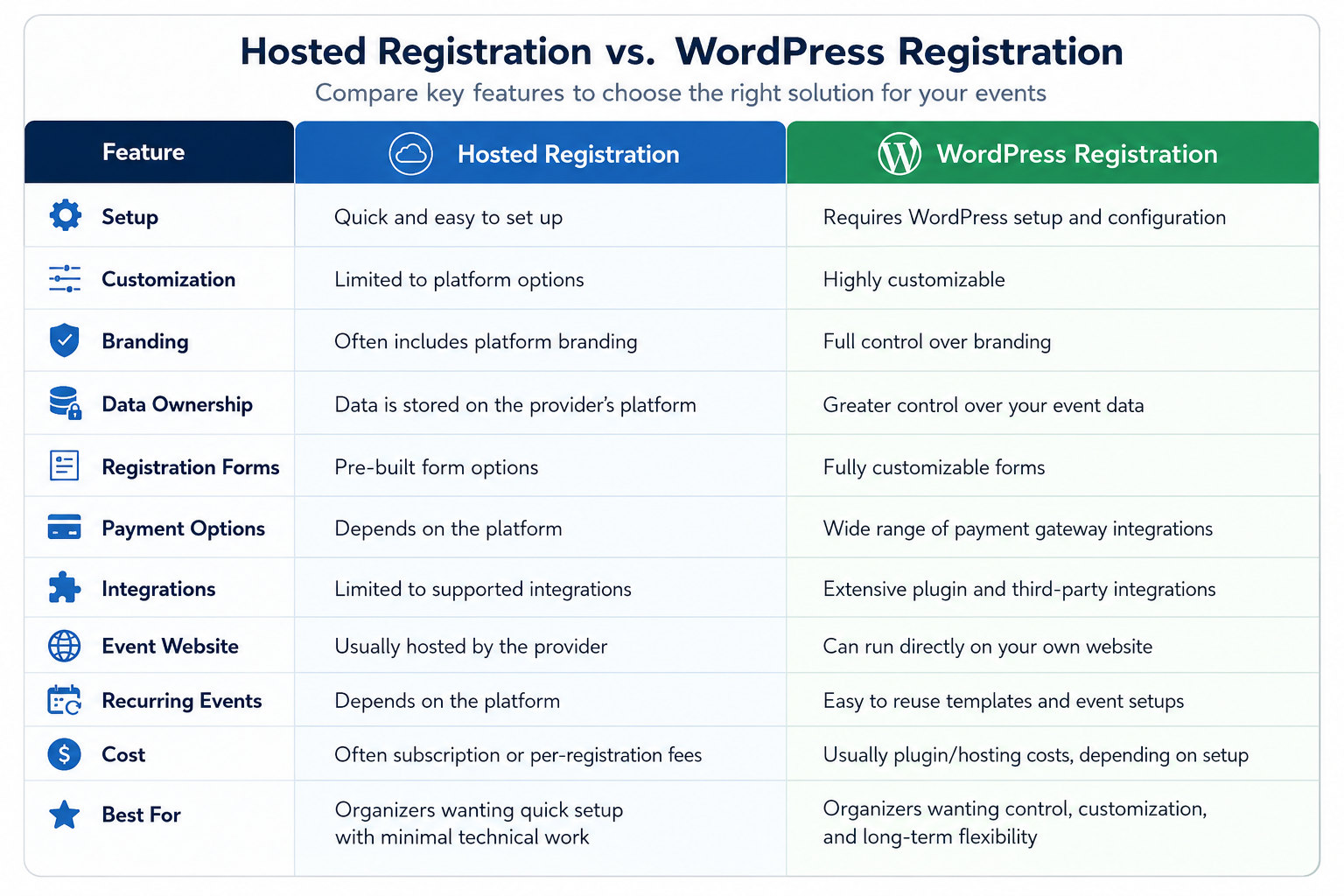
Hosted Registration vs WordPress Registration
How WP Event Manager Handles Event Registration
When it comes to WordPress event registration tools, the first name that comes to mind is WP Event Manager. It offers an all in one solution to all event related requirements through its premium add-ons.
Besides the Registration add-on, here are the other addons that you can use to make your event registration system strong.
- Sell tickets: Allows you to sell event tickets with WooCommerce.
- Calendar: Enables you to display yout event dates and details in a detailed calendar.
- Event countdown: Use this addon to attach a countdown timer to your registration page to create a sense of urgency among users.
- WP Seats: Lets users to select their preferred event seats while registering or purchasing the event tickets.
- SMS notification: Simplify event communication by enabling SMS notifications for attendees.
- Mobile app: Bring your event management to your mobile device through the app with which you can access all your events and their registration details on your phone.
Note: The registration and sell tickets addons go hand in hand which means to utilize the benefits of the registration addons, you need to have the sell tickets addon as well. The best part about WP Event Manager is that you get a branded mobile app absolutely free with the Sell Tickets addon that makes registration management super easy for event organizers.
Apart from the above mentioned tools, you can also opt for a WordPress events themes from WP Event Manager that perfectly suits your website’s existing design. Just select your preferred theme and purchase it from WP Event Manager. All the themes are mobile friendly, compatible with all the WP Event Manager addons and WooCommerce.
Common Event Registration Mistakes to Avoid
Common event registration mistakes can create unnecessary friction for both organizers and attendees. Starting from complicated forms to poor mobile experience, and missing confirmation emails, such small issues can lead to abandoned registrations. That is why event organizers should keep the process simple, mobile-friendly, and easy to complete from start to finish. Find more on such common event registration mistakes in our previous article on common event registration mistakes to avoid.
Create a WordPress event registration system on your website with WP Event Manager
Here are the steps you need to take to create a registration system on your events website with WP Event Manager:
- Install WP Event Manager for free for free.
- Purchase your preferred addons from WP Event Manager.
- Install the addons including Registration.
Once you install and activate your Registration and other addons you, need to make changes to the settings section. Now you are ready to work with it on your website.
Wrapping up
Managing event registrations require the right tools and a solid event registration strategy. We hope that the WordPress event registration guide will help you manage your event registration easily and maximize attendees in your events.
Frequently Asked Questions
1. How does an event registration work in WordPress?
To manage event registration in WordPress, you need to use a feature reach event registration plugin that will allow you to create a registration form for your event.
2. What should an event registration form include?
The answer depends on the type of event that you are organizers. With a customizable event registration form, you will be able to collect the data from your attendees that you want.
However, you can add the following fields to all types of events registration form:
- Full name
- Email address and phone number
- Company or organization
- Job title or profession
- Payment details, if applicable
- Dietary or accessibility preferences
- Session or workshop preferences
- Consent and communication preferences
3. Can WordPress Collect Attendee Information?
Yes, with WordPress event registration plugin, it is possible to collect attendee information, which can be fully utilized for better marketing campaigns and event personalization.
4. Can registration include payments?
Yes. An event registration system can combine registration and payment in one process. For paid events, attendees can select their ticket, enter their details, and complete payment online. WordPress registration solutions can integrate with payment gateways such as Stripe, PayPal, or WooCommerce, while automatically recording payment and registration details.
5. How can I improve event registraiton conversion?
Improve event registration conversion by keeping forms short, mobile-friendly, and easy to complete, with clear pricing and multiple payment options.
Avoid unnecessary fields, build trust with secure checkout, and provide instant confirmation to reduce drop-offs.
The post WordPress Event Registration: What to Look For appeared first on WP Event Manager.


0 Commentaires