WP Event Manager is a better alternative to The Events Calendar for organizers who’d rather run events on their own WordPress site and skip paying for tools they never touch. You get the core plugin for free, plus 42 premium add-ons, 28 event themes, a check-in app for your phone, and support from people who work on event sites every day.

So what makes it the stronger pick? Let’s go through it feature by feature.
The Events Calendar vs WP Event Manager: Overview
A website that only lists dates doesn’t do much for an events business anymore. Visitors expect to search events, see them on a calendar, buy a ticket and get it by email without leaving your site. That’s the job of a WordPress event management plugin, and The Events Calendar and WP Event Manager are two of the best known.
The Events Calendar is now owned by Liquid Web and sold in three fixed yearly plans that start at $259. WP Event Manager takes a different route: you start free and add only the add-ons your events need, from $49 a year.
You’ll want a plugin like these when you need to:
- Create event listings on your website
- build a calendar that shows dates and event details
- sell tickets for your events
- manage the frontend and backend of your event pages
- add search filters and customize how events look
- keep track of registrations, attendee details and who has checked in
Introduction to The Events Calendar and WP Event Manager
The Events Calendar is a popular WordPress plugin for putting an events calendar on your site. The free version shows your events in month, list and day views. Ticketing with no commission, recurring events, QR check-in, seating maps and email campaigns are sold separately through yearly plans from Liquid Web, starting at $259.
WP Event Manager is a lightweight WordPress event management plugin for building a complete events website. The free plugin already covers event listings, a frontend submission form, search filters and an organizer dashboard. On top of that, you can add any of its 42 premium add-ons for registrations, ticket selling, recurring events, Zoom events, SMS reminders or a HubSpot sync. There’s also a mobile check-in app for Android and iOS, used with the Event App add-on, that scans QR codes and keeps working offline. More than 30,000 organizers use it today, and the plugins have passed 1,026,120 downloads.
Along the way, the team picked up the SME Business Award in 2024, plus The WP Awards, the World MSME Business Award and a spot on HackerNoon’s Startups list in 2023.
How Do They Compare on Performance?
When people talk about plugin performance, they usually mean page load time, memory use, and whether the site holds up when a big crowd shows up at once. Most of that comes down to how much code runs each time a page opens.
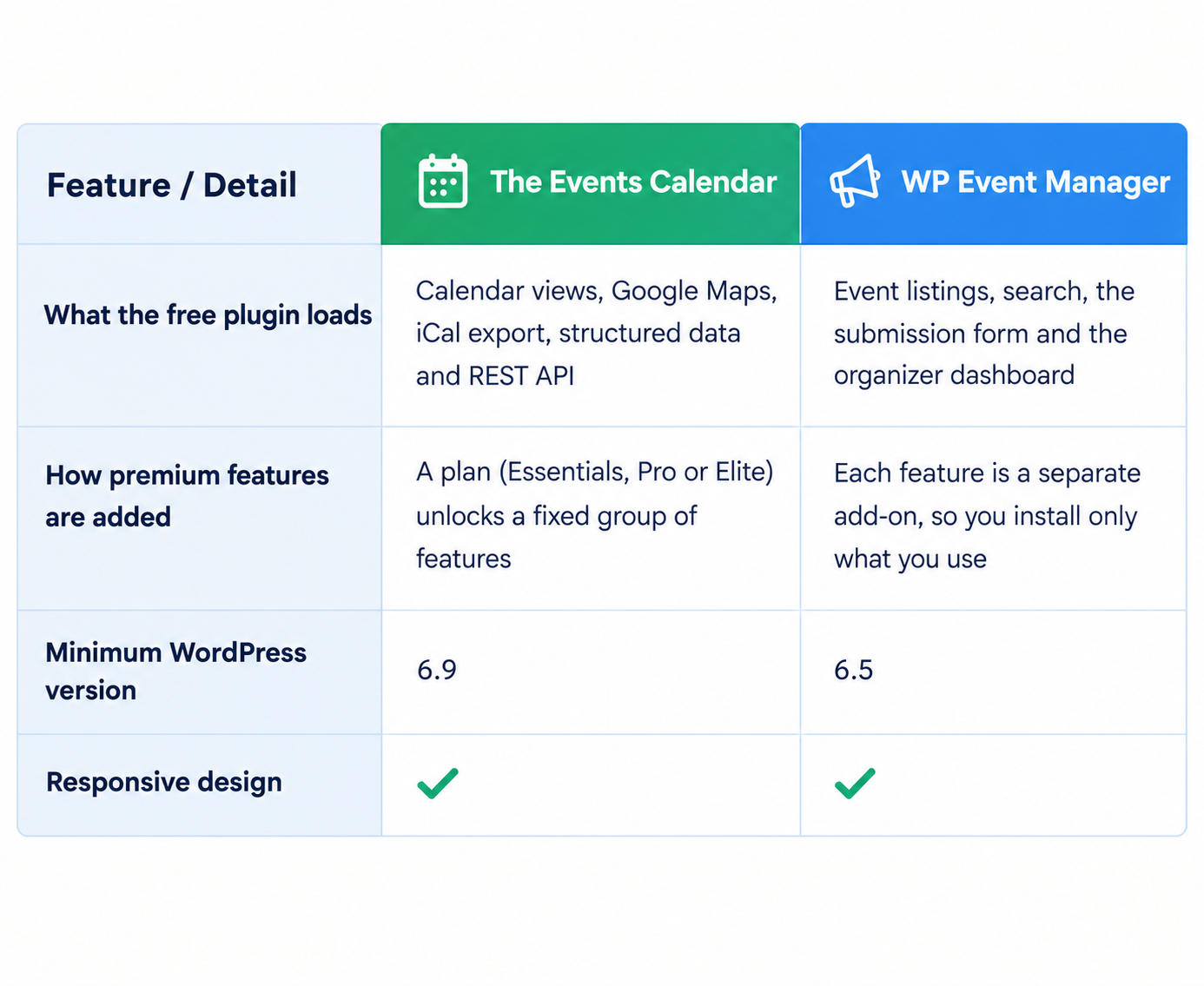
WP Event Manager keeps its free core small and puts the calendar, maps, tickets and integrations in separate add-ons. A site only loads the parts it has installed, so a simple event listing site stays light. The Events Calendar ships much more inside the free plugin, which means more code runs whether you use those features or not.
Your hosting and theme matter too. To see the difference on your own site, install WP Event Manager on a staging copy, add your events and check page load time with Query Monitor or Google PageSpeed Insights.
Which Plugin Gives You More Features?
WP Event Manager gives you more of the tools organizers use every day in its free plugin, and many more specialist tools as add-ons. The Events Calendar puts several of these behind its paid plans.
In the table below, “Paid” means you need one of The Events Calendar’s plans for that feature.
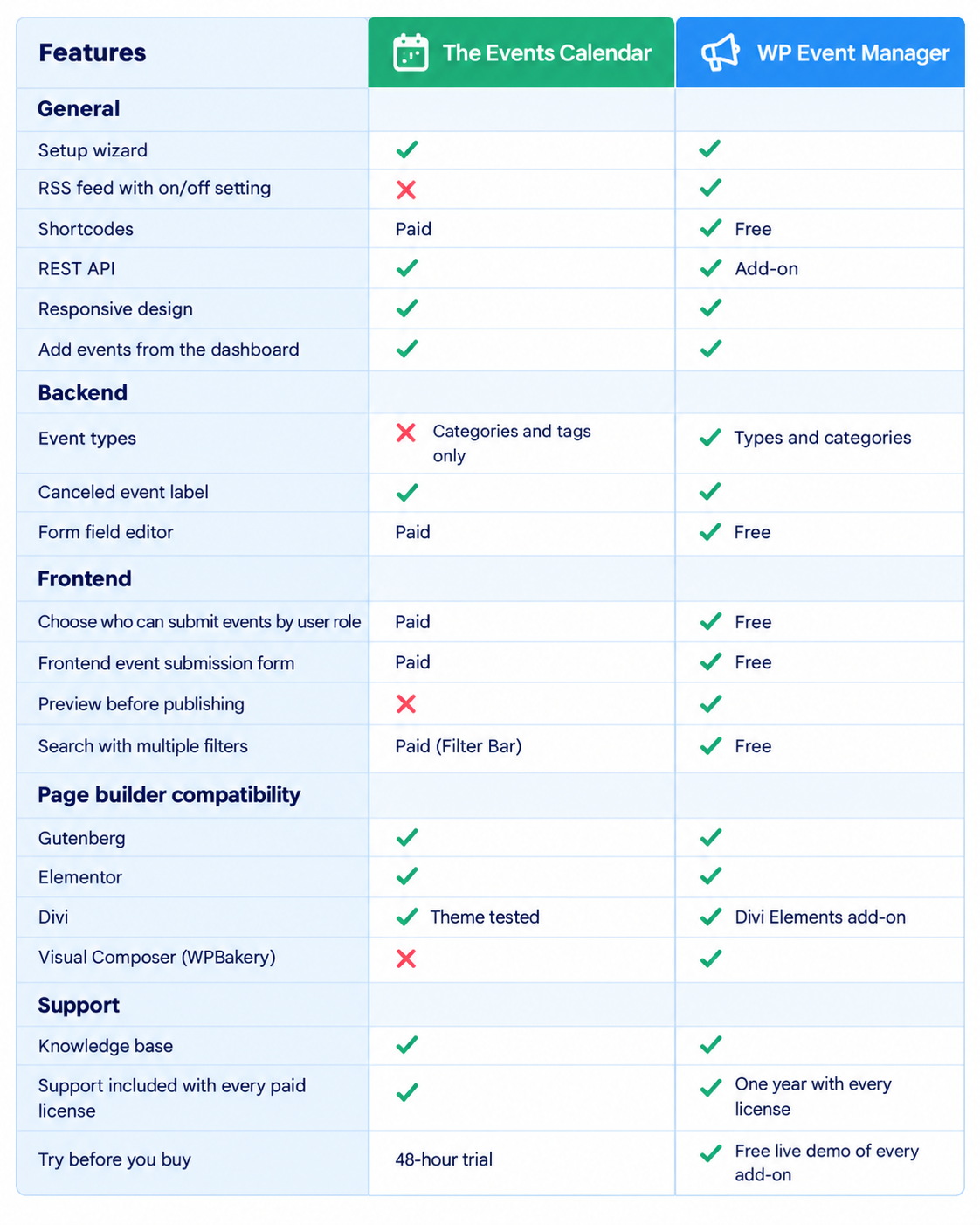
WP Event Manager gives you frontend submission, a field editor, search filters and shortcodes for free. With The Events Calendar, you’d need a paid plan to get the same.
Which One Do Developers Find Easier to Work With?
WP Event Manager is built so developers can shape each site around the client. Since features come as separate add-ons, a client site only gets the pieces that client asked for. The code is also organized so developers can build on it without much digging. The Rest API add-on lets you pull event data into a mobile app or another system. Shortcodes are handy too, since you can drop an event list onto any page.
The Events Calendar has hooks, filters and REST API endpoints as well. Its templates, though, only allow partial overrides, and you’ll need Events Calendar Pro before you can use shortcodes.
For site owners who don’t code, WP Event Manager gives you these tools in the free plugin:
- An event submission form on the frontend
- A field editor to add, edit or remove form fields
- Event types and categories for sorting events
- An event preview before publishing
- A dashboard where organizers manage their own events
- A layout that fits phones and tablets and works in Gutenberg or Elementor
Which Plugin Does More for Your SEO?
For an event to show up in search, Google has to work out what it is, the date and the place. WP Event Manager files each event under a type and a category, say a workshop under Business. With the Event Tags add-on you can tag events as well, which ties similar events together for visitors and for search engines.
WP Event Manager’s core is small, so event pages don’t carry code they aren’t using. Google does take page speed into account. There are also 28 event themes made for these add-ons, so the layout looks right without piling on extra plugins. Together that helps you:
- build trust in your brand when people find your events in search
- bring in more organic traffic
- help visitors find their way around your site
How Does Each Plugin Handle WooCommerce?
WP Event Manager is built around WooCommerce from the start. The Sell Tickets add-on runs payments through WooCommerce, which means Stripe, PayPal, bank transfer and the other gateways your store supports all work. You also keep 100% of your ticket revenue. If other organizers post events on your site, you can charge them a fee through WooCommerce Paid Listings. Each ticket sale can then be divided between you and them with Stripe Split Payment.
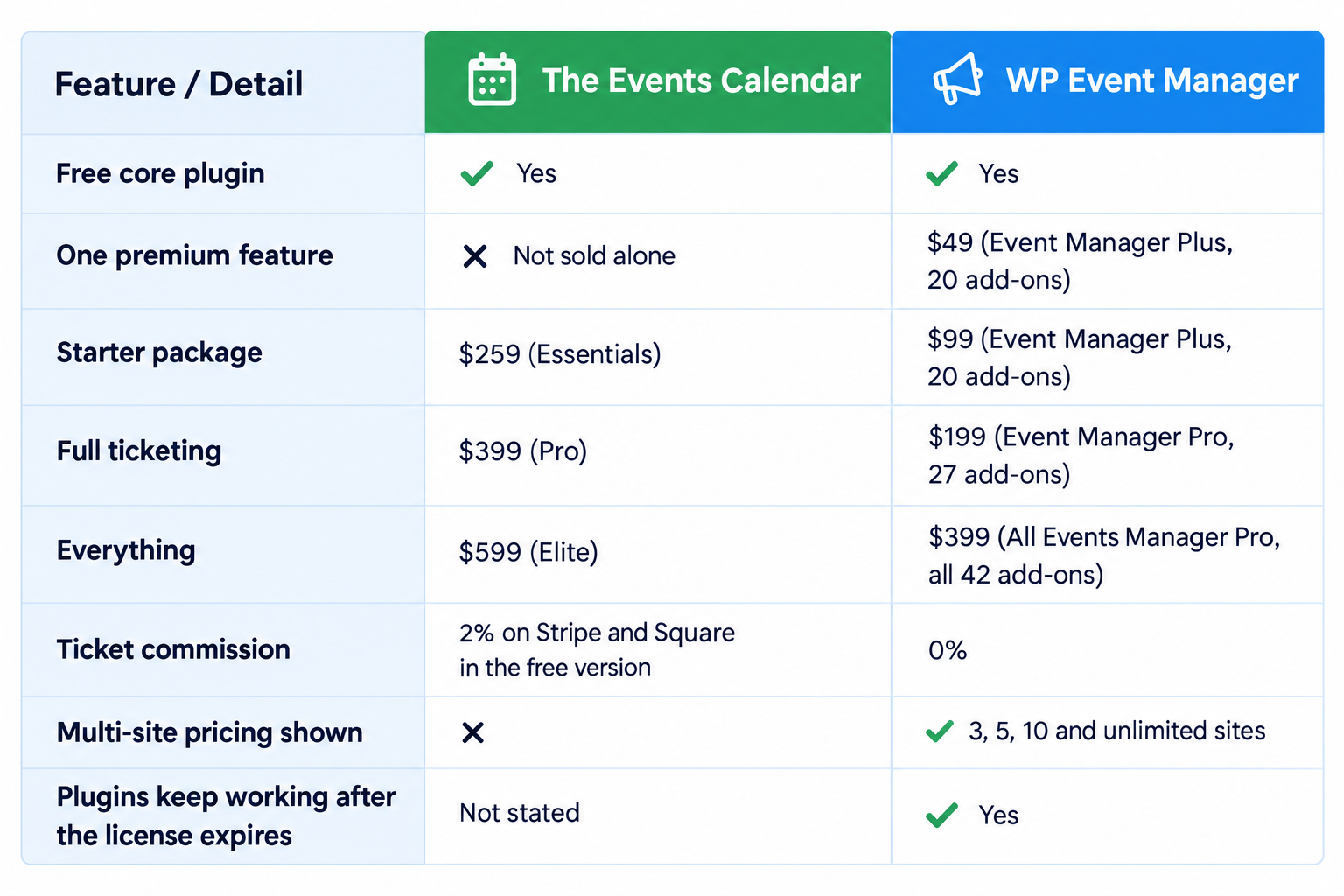
The Events Calendar’s free Event Tickets plugin uses its own checkout and charges a 2% fee on Stripe and Square sales. To remove that fee and get WooCommerce ticketing, you need the Pro plan at $399 a year.
Here’s what WP Event Manager’s ticket and registration add-ons give you:
Sell Tickets
- Payments through WooCommerce gateways like Stripe, PayPal and bank transfer, with no commission
- Paid, free and donation tickets, with ticket limits and optional fees
- PDF tickets sent by email, each with a QR code for check-in
- Ticket insights and a sales timeline in one place
Registrations
- Custom registration forms with sign-up limits
- A block on duplicate sign-ups from the same email
- Confirmed, waiting and canceled statuses, attendee notes and CSV export
- A ‘My Registrations; page where attendees can see and manage their own bookings
How Many Add-ons Does Each Plugin Offer?
WP Event Manager has 42 premium add-ons in four groups: 21 feature add-ons, 8 ticket selling add-ons, 10 marketing add-ons and 3 virtual event add-ons. You can buy any one of them on its own, so you never pay for a bundle of tools you won’t use.
The Events Calendar doesn’t sell most of its tools one by one. You choose a plan, and each plan unlocks a fixed group of features. Many of the marketing and CRM tools WP Event Manager offers as direct add-ons aren’t available from The Events Calendar at all, or only through a separate Zapier connection.
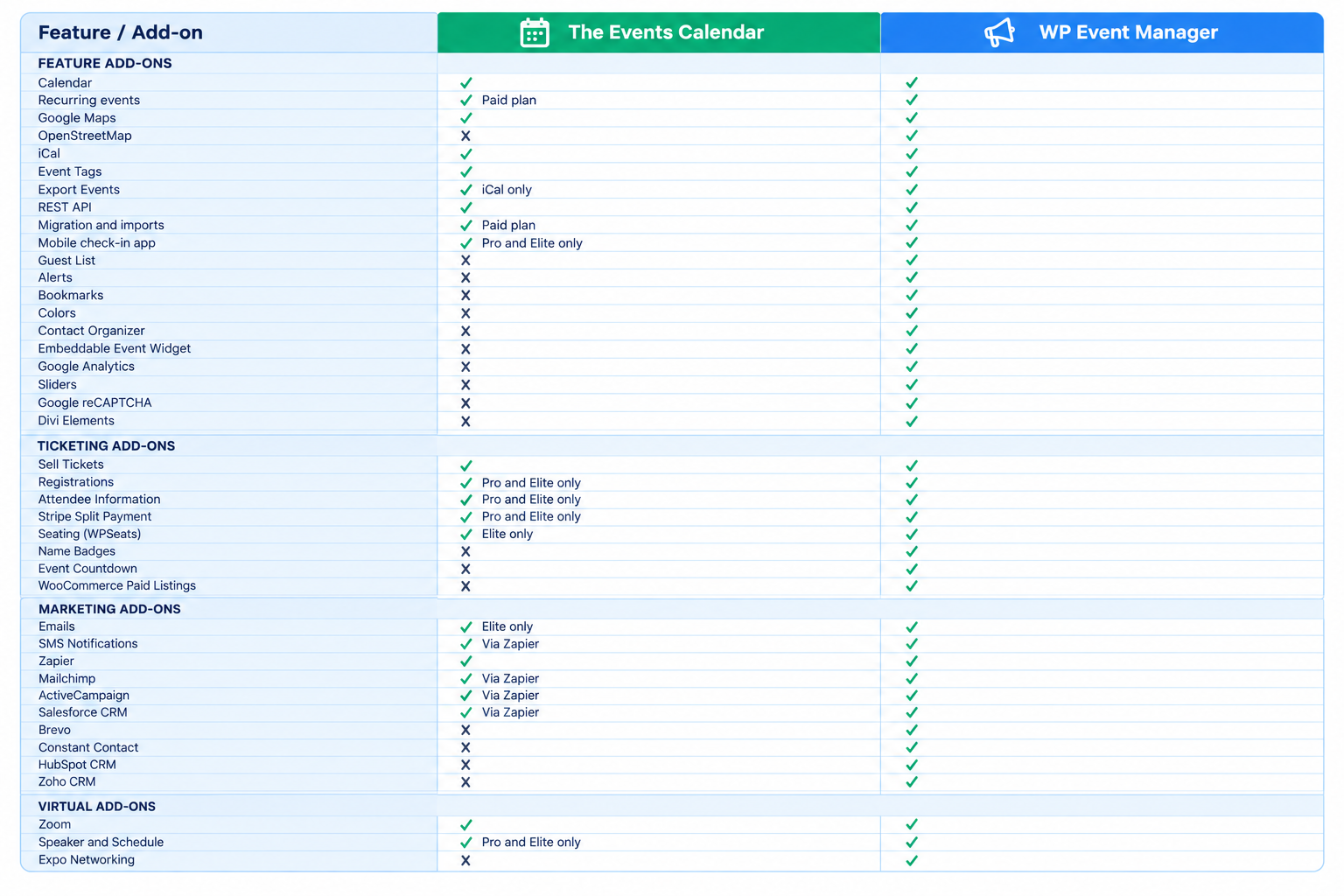
That’s 42 tools you can pick from one at a time with WP Event Manager, including more than a dozen The Events Calendar doesn’t offer.
1. Moving From The Events Calendar to WP Event Manager
Switching is simple. WP Event Manager’s Migration add-on moves your events, venues and organizers over from The Events Calendar, so you don’t have to re-enter them. If you’d like a hand, the WP Event Manager support team can walk you through the move.
2. Mobile Check-in App
The WP Event Manager Event App is free to download on Google Play and the App Store. Connect it to your site with the Event App add-on, along with Sell Tickets, Registrations and Guest List, and your whole team can run check-in from their phones.
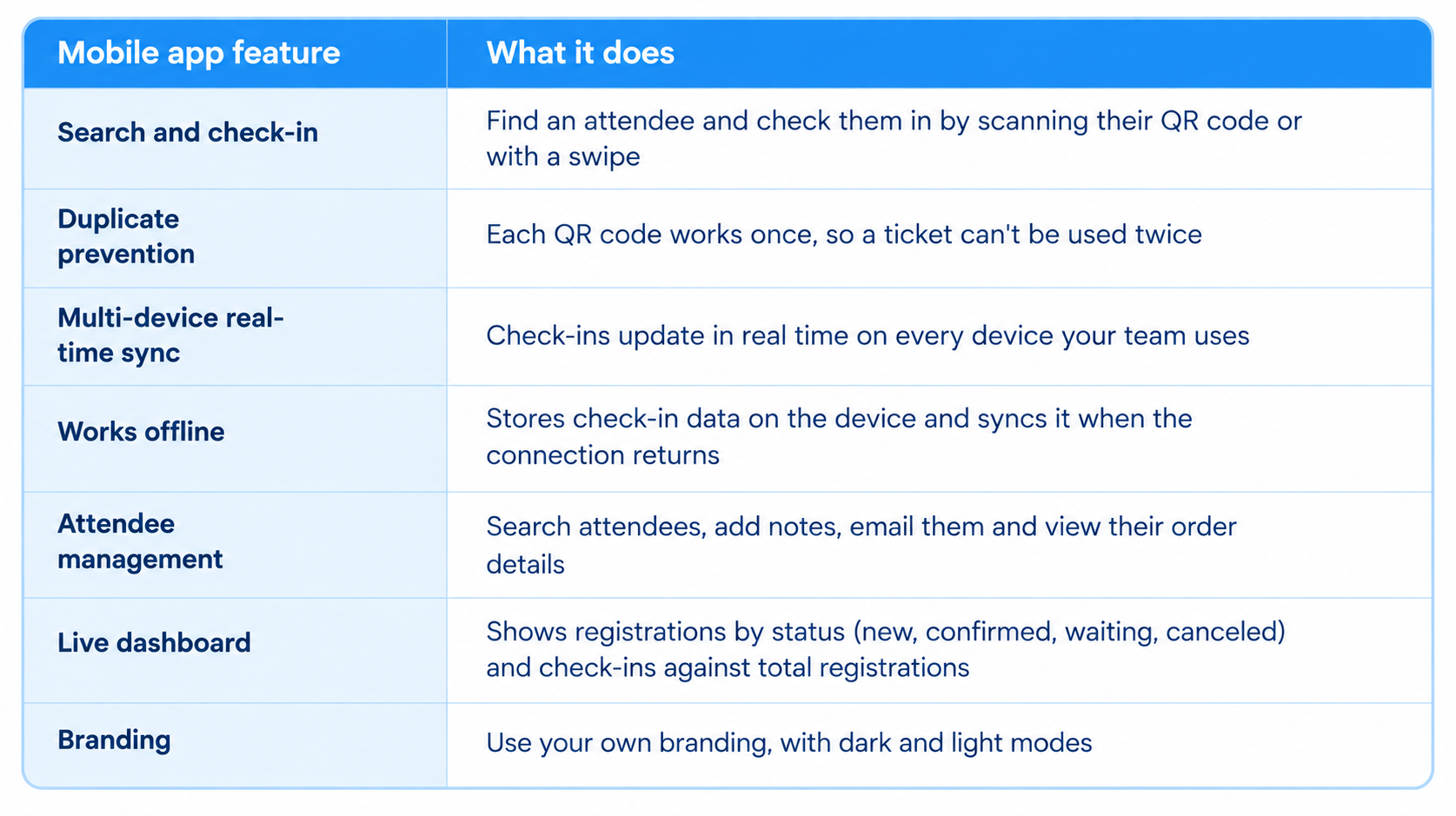
With The Events Calendar, QR check-in only comes with the Pro and Elite plans, which start at $399 a year.
What Kind of Support Do You Get?
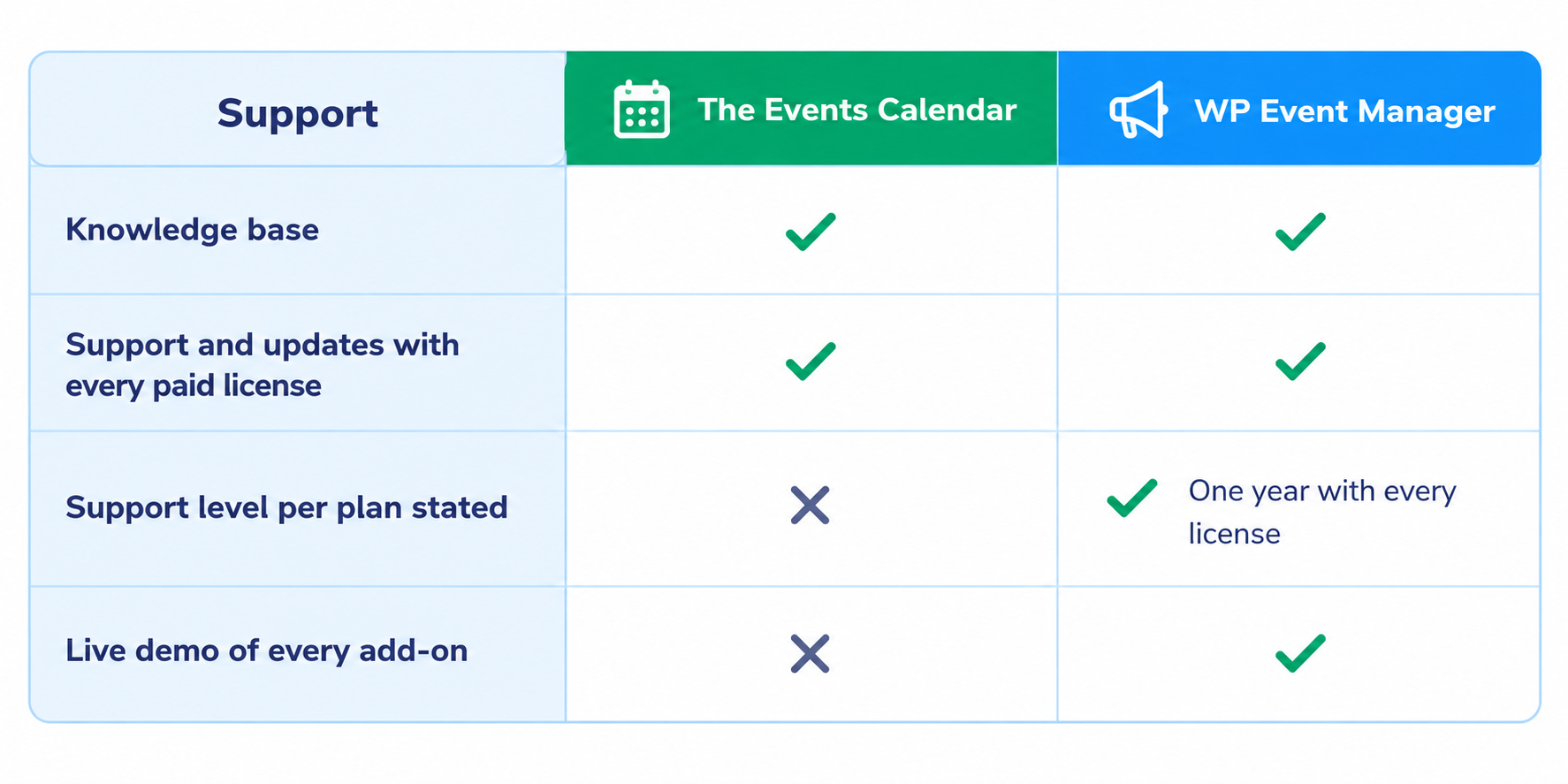
WP Event Manager’s support comes from the same team that builds the plugin. Free users get a full knowledge base, and every paid license includes one year of support and updates through the help center. Before you buy, you can try every add-on on the live demo, so you know exactly what you’re getting.
The Events Calendar’s documentation has moved to docs.nexcess.com, and free users are pointed to the WordPress.org forum. Liquid Web’s plan page doesn’t say what support each plan includes.
How Does the Pricing Compare?
This is where WP Event Manager pulls furthest ahead. You start free, and you pay only for the add-ons you need. A single add-on such as Calendar or Sell Tickets costs $49 a year for one site. The Events Calendar’s cheapest plan is $259 a year, and full ticketing costs $399.
WP Event Manager has four bundles, each with clear prices for more sites:
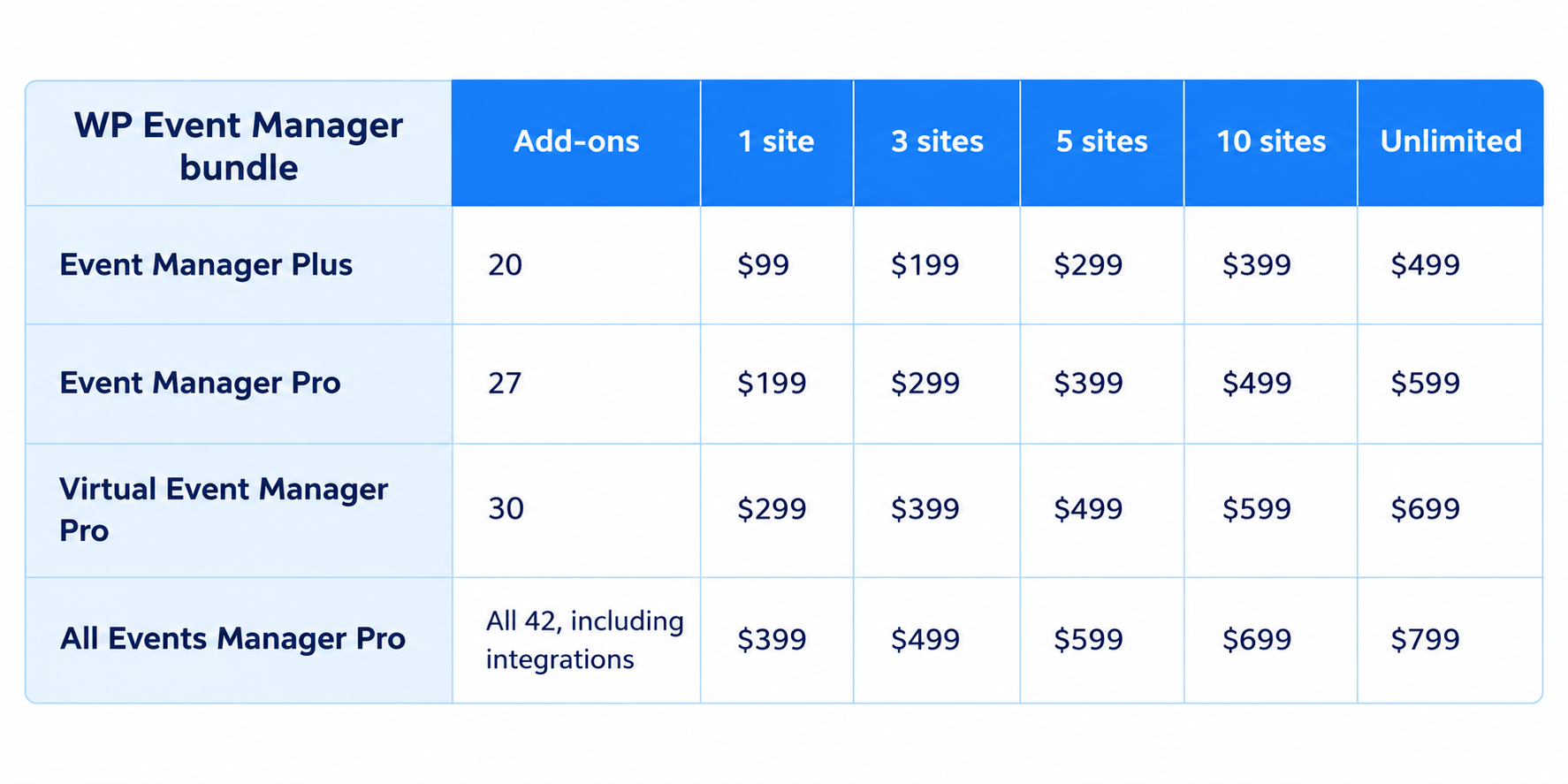
Event Manager Plus covers the feature add-ons, such as Calendar, Google Maps and iCal. Event Manager Pro adds ticket selling with Sell Tickets, Registrations and Stripe Split Payment. Virtual Event Manager Pro adds Zoom, Speaker and Schedule and Expo Networking. All Events Manager Pro adds every marketing add-on, from Mailchimp and Brevo to Zoho CRM, plus WPSeats.
The full All Events Manager Pro bundle, with all 42 add-ons, costs $399 for one site. That’s the same as The Events Calendar’s Pro plan and $200 less than Elite. Your plugins also keep running if you ever let a license lapse. Only updates and support pause until you renew.
Which Plugin Has Better Theme Support?
WP Event Manager has 28 event themes of its own, built to work with its add-ons out of the box. You don’t have to test theme and plugin combinations or hire someone to fix layouts, which makes it much faster to launch a new events site.
The Events Calendar doesn’t offer event themes. It says it’s tested with general theme frameworks like Avada, Divi, Enfold and Genesis, so matching the look of your event pages is up to you.
Why Choose WP Event Manager Over The Events Calendar?
WP Event Manager was built for one job: helping organizers run events from their own WordPress site. Here’s what that means for you:
- You pay for one feature at a time, starting at $49 a year, instead of a fixed plan
- You keep 100% of your ticket revenue, with no commission on any sale
- Your events, attendee data and ticket sales stay on your own website
- In-person, virtual and hybrid events all run from one plugin
- 42 add-ons cover everything from Zoom and name badges to HubSpot and SMS
- 28 event themes let you launch a complete events site without a designer
- The Event App handles QR check-in and check-out on any phone, even offline
- Your plugins keep working if a license expires
It works for event professionals who need a full toolkit, developers and agencies building client sites, small businesses that want something simple, and community groups on a tight budget. More than 30,000 organizers already use it, and the team has won the SME Business Award (2024), The WP Awards (2023) and the World MSME Business Award (2023).
Is WP Event Manager the Right Alternative to The Events Calendar?
If you want more features for less money, tools The Events Calendar doesn’t offer, and a team focused only on events, WP Event Manager is the better choice. You get frontend submission, field editing and search filters free, ticketing with no commission for $199 a year, and 42 add-ons to grow into.
The easiest way to see it for yourself is to try it. Install the free WP Event Manager plugin, explore the live demo, and add only the add-ons your events need.
Frequently Asked Questions
1. Is WP Event Manager better than The Events Calendar?
Yes, WP Event Manager is the better choice for most organizers. It costs less than The Events Calendar, charges no commission on tickets, and lets you pick from 42 add-ons one at a time.
2. Which is cheaper, WP Event Manager or The Events Calendar?
WP Event Manager is the cheaper option. Its add-ons start at $49 a year, while The Events Calendar’s plans start at $259 a year.
3. Do WP Event Manager and The Events Calendar charge a commission on tickets?
WP Event Manager doesn’t charge any commission, so you keep 100% of your ticket sales. The Events Calendar’s free Event Tickets plugin takes a 2% fee on Stripe and Square payments.
4. Which plugin gives you more features for free?
WP Event Manager gives you more in its free plugin, including frontend submission, a form field editor, search filters and shortcodes. On The Events Calendar, you need a paid plan to get these features.
5. Which is better for virtual and hybrid events?
WP Event Manager is the better fit, since its Virtual Event Manager Pro bundle includes Zoom, Speaker and Schedule and Expo Networking. The Events Calendar supports Zoom, but it doesn’t have a networking add-on.
The post The Events Calendar vs WP Event Manager complete comparison appeared first on WP Event Manager.


0 Commentaires