There is no doubt that event management in 2026 bears little resemblance to how it used to be just a few years ago. Considering the increasing SaaS fees, evolving audience preferences, and strict data privacy laws, event organizers are constantly discovering new ways to manage events digitally with efficiency.
Today’s event planners prefer AI adoption and automation of repetitive event management tasks like registration management, email marketing, attendee data handling, etc. This has brought WordPress to the forefront of modern event technology as it supports all these areas through plugins like WP Event Manager.
The recent shift in WordPress event management is driven by various factors, and the growing expenses of SAAS based event platforms is one of the significant ones among them.
Whether you are an event planner looking for a cost effective solution for event management without SAAS fees or you want to modernize your event management system keeping pace with the recent trends, this article is for you. In this WordPress event management guide, you will discover WordPress event management trends, how you can avoid SAAS fees with WP Event Manager, and more to streamline your event management process in 2026 without breaking the bank.
WordPress event management in 2026
A major part of WordPress event management in 2026 is covered by AI and Automation. As event planners are drifting away from the traditional SaaS based platforms and stepping towards fully owned event platforms, event management in 2026 will cost-effective and majorly tech driven.
Here’s what management looks like in 2026
- WordPress, to be used as one of the most preferred event platforms for event planners to maintain data ownership, branding and automated event workflow.
- The overall WordPress event management set up in 2026 consists of event plugins, automation tools and mobile friendly designs.
- Personalization, automation, data privacy and integrations will be the main focus areas of WordPress event management.
WordPress event management trends
Event planners will witness a major shift in 2026 with new technological advancements, changing consumer behavior, and a growing emphasis on data security.
Here are the event industry trends that will dominate the year 2026:
- Sustainable event management practices like using recyclable decor, reducing paper usage with digitization and more.
- Reducing reliance on third party platforms by creating in-house ticketing system.
- Usage of AI in major event management activities.
- Influencer-driven events for better audience reach.
- Data driven decision making.
- Adoption of SMS marketing for mobile based event communication.
- Organizing hybrid events to boost the number of attendees and convenience.
- AI based fast matchmaking.
Considering all the WordPress new trends, we recommend WP Event Manager as it offers all the solutions that you need to manage your events in a modern way in the AI and automation era. Let us discuss this in detail.
WP Event Manager, the ultimate WordPress event management partner
WP Event Manager is not just a WordPress event management plugin; it is a complete package for event planners that consists of well structured WordPress event plugins, themes, a dedicated support team, and the trust of thousands of global customers. It can easily be added to your WordPres event tech stack 2026 without disrupting others.
WP Event Manager is the name of the core plugin that offers basic features to help you add your event lists to your WordPress site. It is absolutely free and comes with many useful features that are usually not available with its competitors in the free version.
Some of the key features of WP Event Manager include:
- Advanced search filters to help find events quickly.
- Elaborated event details page.
- Frontend event submission form.
- Easily customizable as per business requirements.
- Detailed dashboard for event organizers and admins containing event lists, status and more.
- SEO friendly.
- Easy past event management system.
- Compatible with various other WordPress tools.
- It comes with detailed user guide and documentation that is available in the Knowlegebase section on our website.
Whether you run huge corporate events or non-profit events, WP Event Manager is the ultimate partner for digital event management.
The best part about the plugin is that it is versatile and flexible that can be used for all types of events with required customization. The coding free solution is often appreciated for its ease of use.
WP Event Manager installation
To add your first event with WP Event Manager, you need to install it. The installation process is super easy. You can install it manually or automatically as per your preferences. Once you install and activate the plugin, you are redirected to the Setup Wizard, which allows you to select and create pages based on your need.
Currently, we have 830,054+ active downloads with thousands of happy customers who are the heart and soul of the brand.
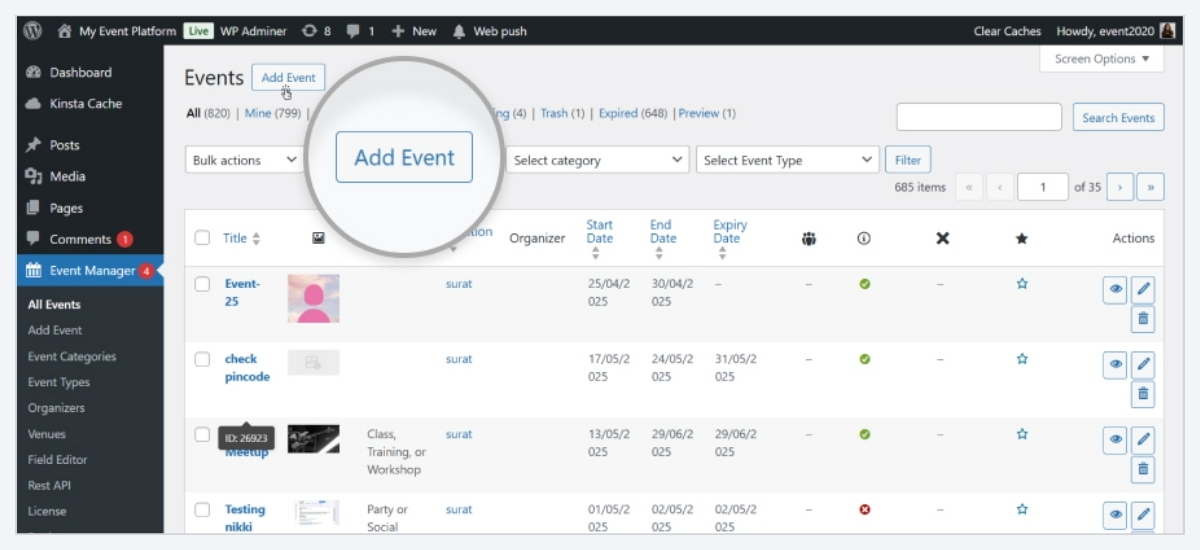
Note: The WP Event Manager Setup Wizard UI is changed for an improved user experience.
After selecting the pages, you are ready to add your events to your website.
WP Event Manager also offers a feature to add feedback for those who deactivate the plugin. This helps us improve the plugin and its user experience in the future.
Awards and recognitions
WP Event Manager started its journey as a WordPress event plugin in the year 2017 with a small and dedicated team of developers and designers under the leadership of Mr.Ashok Dudhat. Since then, the company has never looked back. WIth amazing ratings on popular reviews, it has also received several awards and recognition for its outstanding contribution to WordPress event management industry.
The awards it received include the following:
- WP Event Manager secured the 2nd Position in Monster Awards 2022 for being one of the best booking and appointment WordPress plugins.
- It was Recognized as one of the Most Trusted Indian Companies (2023) by World Brand Affairs
- The brand has also received the Fastest-Growing WordPress Product Company (2023) award at the World MSME Business Summit (WASME) Awards.
- Won Bronze at the WP Awards 2023.
- Became the First Runner-Up in the Startup of the Year 2023 (Hackernoon).
- Best Event Management Plugin for WordPress (2024) at the International Business Conclave.
- In the SME Business Awards 2024, it was recognized as one of the top SME businesses in IT Services – CMS Extensions/Plugins.
There awards reflect the love and trust that we have received from our users throughout the world.
The core plugin offers almost 40 premium addons, and each is designed to fulfill specific event management needs. Let us discover more on that.
WP Event Manager add-ons for different event management needs
As we mentioned, WP Event Manager is an all-in-one WordPress event management solution that covers all event management requirements right from calendar, registration, and ticket sales, to networking, and marketing.
A set of new plugins has also been launched recently to modernize and simplify event management. Let us introduce you to all of them in brief.
Here, we have divided our plugins based on WordPress event management requirements:
1. Feature Addons of WP Event Manager
The feature add-ons of WP Event Manager empower users with various event management functionalities like showcasing events in a calendar, using Google Maps to show event location, and more.
- Calendar: Lets you add a clean calendar on your website to display event dates and details.
- Recurring Events: Eliminates the repetitive task of creating recurring events by automating the entire process.
- Google Maps: Allows users to showcase event location on Google Maps and highlight them for better view.
- Google Analytics: Helps you measure the success of your events and track user behavior on your website.
- OpenstreetMap: Displays event location in a map with an indicator to allow attendees to find nearby event location quickly.
- Sliders: Lets you flaunt your upcoming events in attractive slides with necessary details.
- Embeddable event widget: Allows you to add an impressive event listing widget where ever you want on your website.
- Export Events: Easily transfers your event data through a CSV file.
- Guest List: Helps you manage your attendees smartly by categorizing them into various groups.
- Google reCAPTCHA: Tightens the security of your event website by filtering spam entries.
- Bookmarks: Enables you to bookmark specific events so that you do not have to find important events again and again.
- Organizer App: It brings the entire event management system into the organizer’s mobile with detailed access to event listing, attendee information, registration, ticket sales and more for free.
- Colors: Allows you to add different colors to event types and categories to make it easy for viewers to differentiate them.
2. Ticket Selling Addons
The set of ticket selling addons is not just an addition to your event tech stack; it is a complete money making machine that not only allows you to sell event tickets but also helps you create an event ticket selling platform on your website. These addons are useful for especially those who are looking for an Eventbrite alternative.
- Sell Tickets: It enables you to sell event tickets through WooCommerce on your website.
- Registration: Helps you create a customizable event registration form and add AI matchmaking feature to your events for better networking.
- Stripe Split Payment: Divides event ticket revenue between event organizer and admin based on the commission percentage fixed by the admin.
- WooCommerce Paid Listing: Allows you to create subscription packages for event organizers who want to sell event tickets on your webite.
- Attendee Information: Offers detailed attendee information that they provide you during the registration process for better data management.
- WP Seats: Helps you sell your event seats by creating a custom seating chart for each event and adding different price levels for the same.
- Name Badges: Lets users create on demand event badges quickly using their brand logo, color and preferred layout.
- Event Countdown: Creates a sense of urgency among attendees by adding a countdown timer to your event’s registration or ticket section.
3. Marketing Addons
Marketing addons of WP Event Manager are exclusively designed to elevate the marketing journey of every event organizer. The recent technical shift in the event industry has clearly defined the need for data driven marketing in 2026. Considering the latest event marketing trends, WP Event Manager offers marketing addons that automate email marketing and give full control over attendee data in the event organizers’ hands.
- SMS Notification: Allows event organizers to send real-time event notifications to attendees through SMSes.
- Zapier Integration: Automates major event operations to eliminate manual efforts and save time.
- Salesforce CRM: Syncs attendee data and automates emails marketing with customizable event messages.
Note: WP Event Manager offer 5 more CRM plugins including Sendinblue, Mailchimp, Zoho CRM, Hubspot, and Constant Contact that offers the same functionality and gives users to choose the platform that they prefer.
- Emails: Lets the admin send event notifications to the organizer through emails.
4. Virtual Event Addon
WP Event Manager is a versatile plugin that goes well with all types of events, including virtual and hybrid events. Hybrid events is one of the hottest new event industry trends and the features that the virtual add-ons of WP Event Manager provide perfectly fulfill the modern requirements. Starting from setting up a perfect virtual exhibition or networking event to promoting and selling tickets for the same, the plugins empower users with every feature.
- Expo Networking: Helps you create various types of virtual events like exhibitions with booths, networking sessions, speaker interactions and more.
- Speaker and Schedule: Allows you to display the details of your event speakers along with their session schedule.
- Zoom: Enables you to manage your virtual meetings, conferences, webinars and more directly from your WordPress dashboard.
These addons are exclusively designed to make hosting virtual events on WordPress simple and smooth.
5. WP Event Manager themes
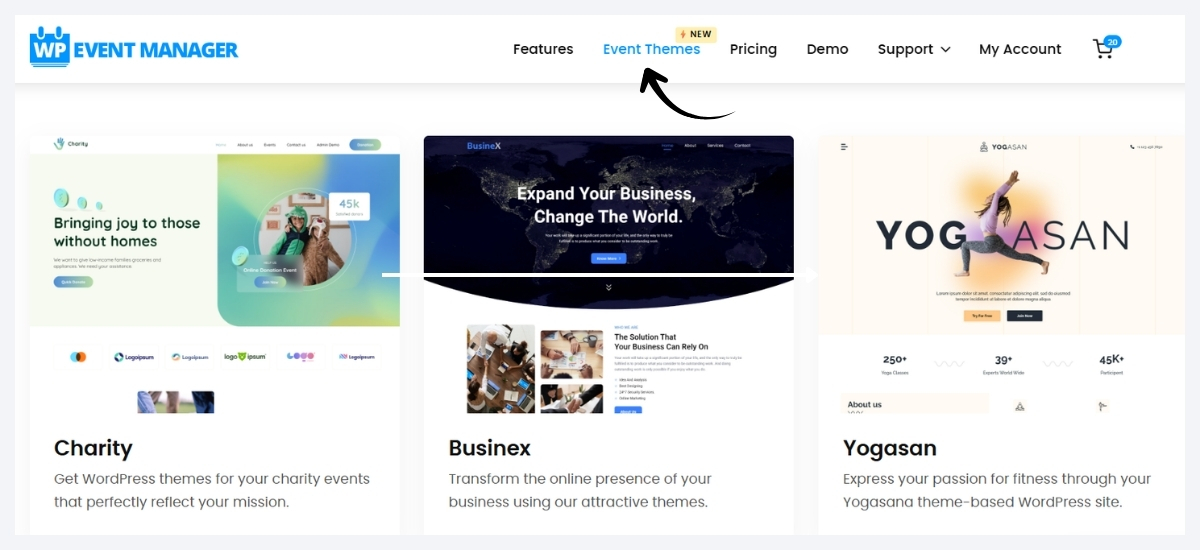
WordPress event themes are one of the most essential elements of an event website that determines your website’s branding style, mobile friendliness, and visibility online.
Besides a wide range of event management add-ons, WP Event Manager provides a set of premium WordPress event plugins to help you design your events website or improve the existing one.
Most event organizers or website owners struggle to find a suitable event theme for their events website that will be compatible with the event plugins and other tools that they use on their website. Considering this issue, WP Event Manager has come up with its own event themes that are:
- Compatible with all its premium addons.
- Responsive.
- WooCommerce friendly.
- SEO friendly.
- Easily customizable.
Event planners often get confused about how to choose the best WordPress event theme for their website but let us tell you that each theme offered by WP Event Manager carries all the qualities that a good theme must have. The best part is that it can be easily installed into your system.
WP Event Manager as an EventBrite alternative
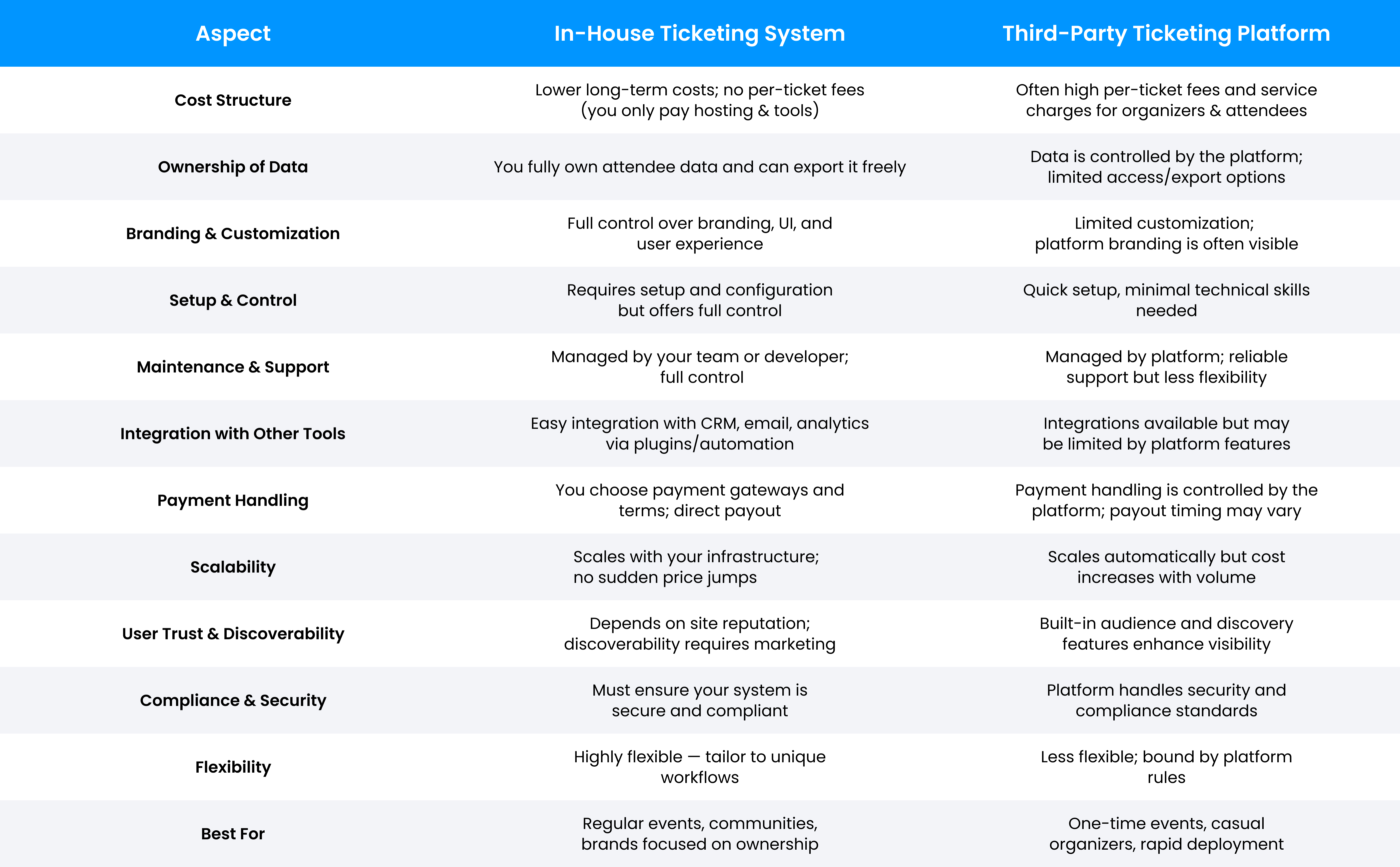
Let’s face it, third-party reliance for selling event tickets is not costly but also takes away the sense of ownership because everything starting from attendee data collection to ticket transactions is managed through that platform. On the other hand, having an in-house ticketing platform gives you attendee data ownership, seamless order management, and the scope to connect with your attendees directly.
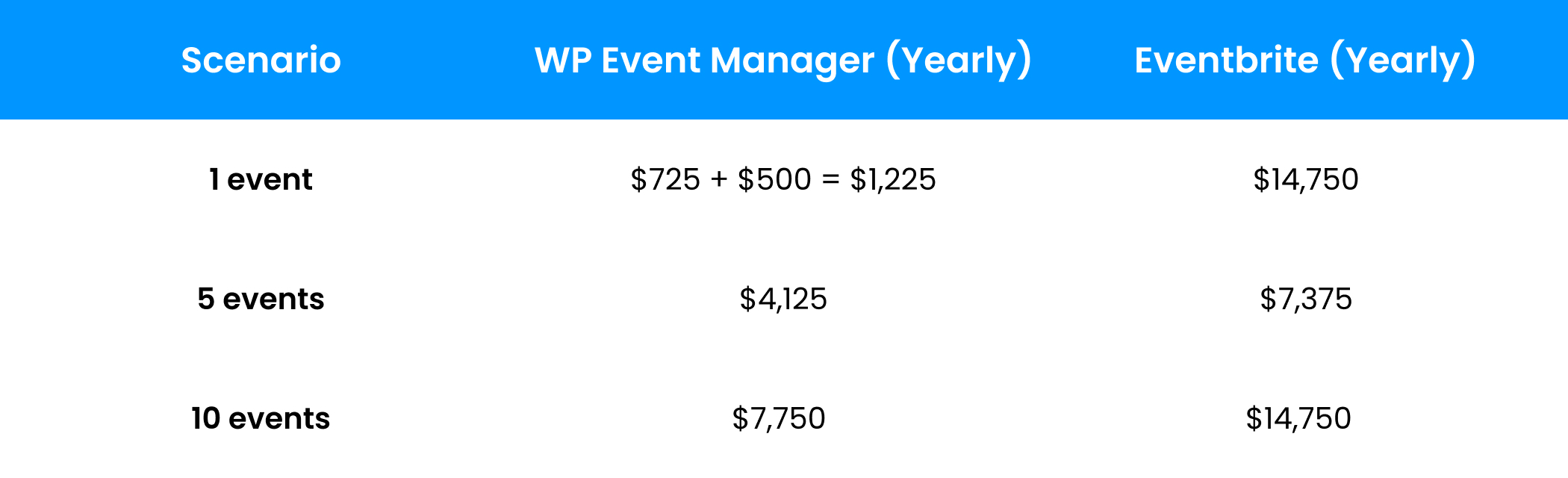
Consider the following chart to see the differences between the in-house ticketing system and third-party ticketing platform.
Event Cost Comparison: WP Event Manager vs Eventbrite
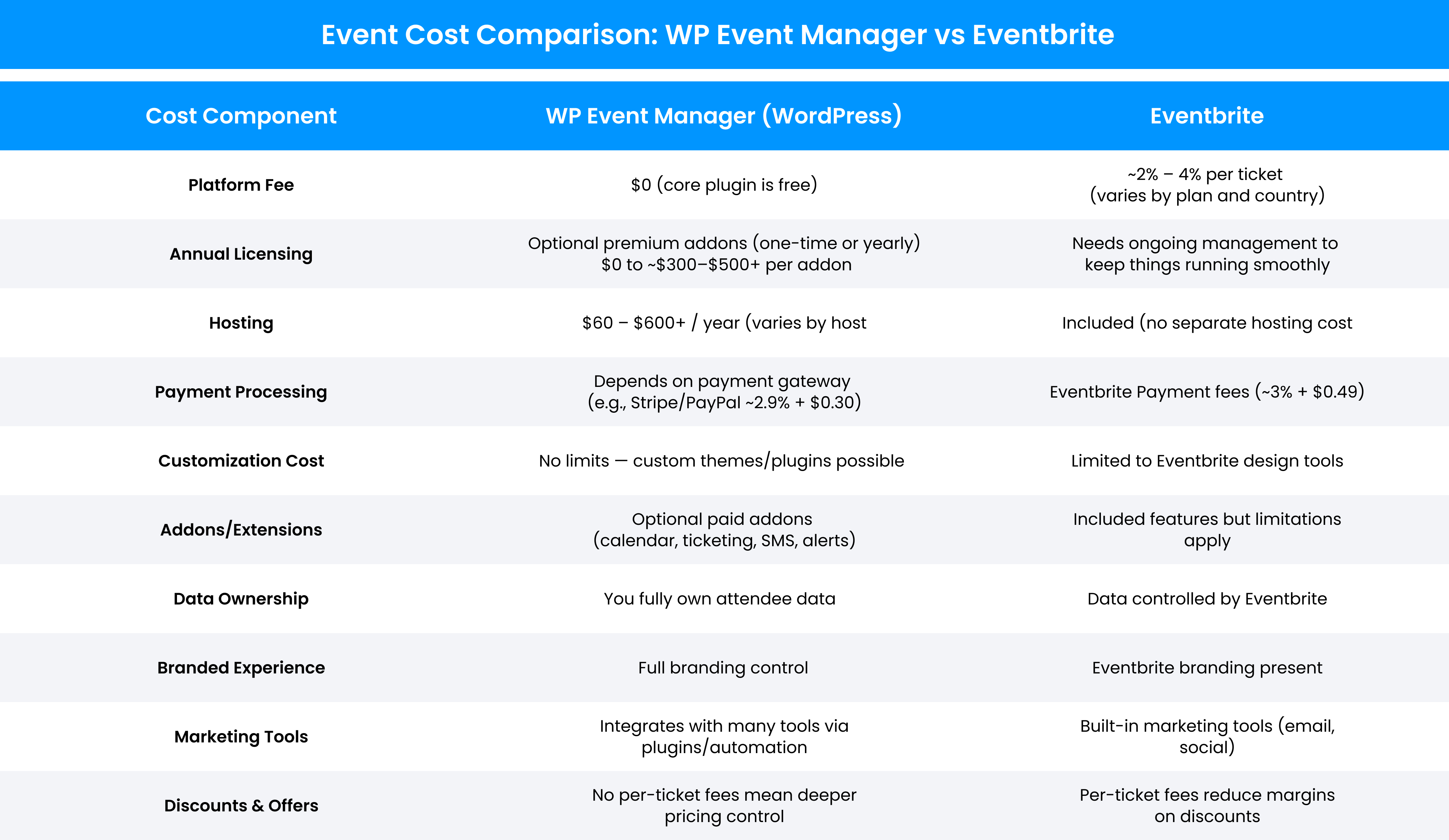
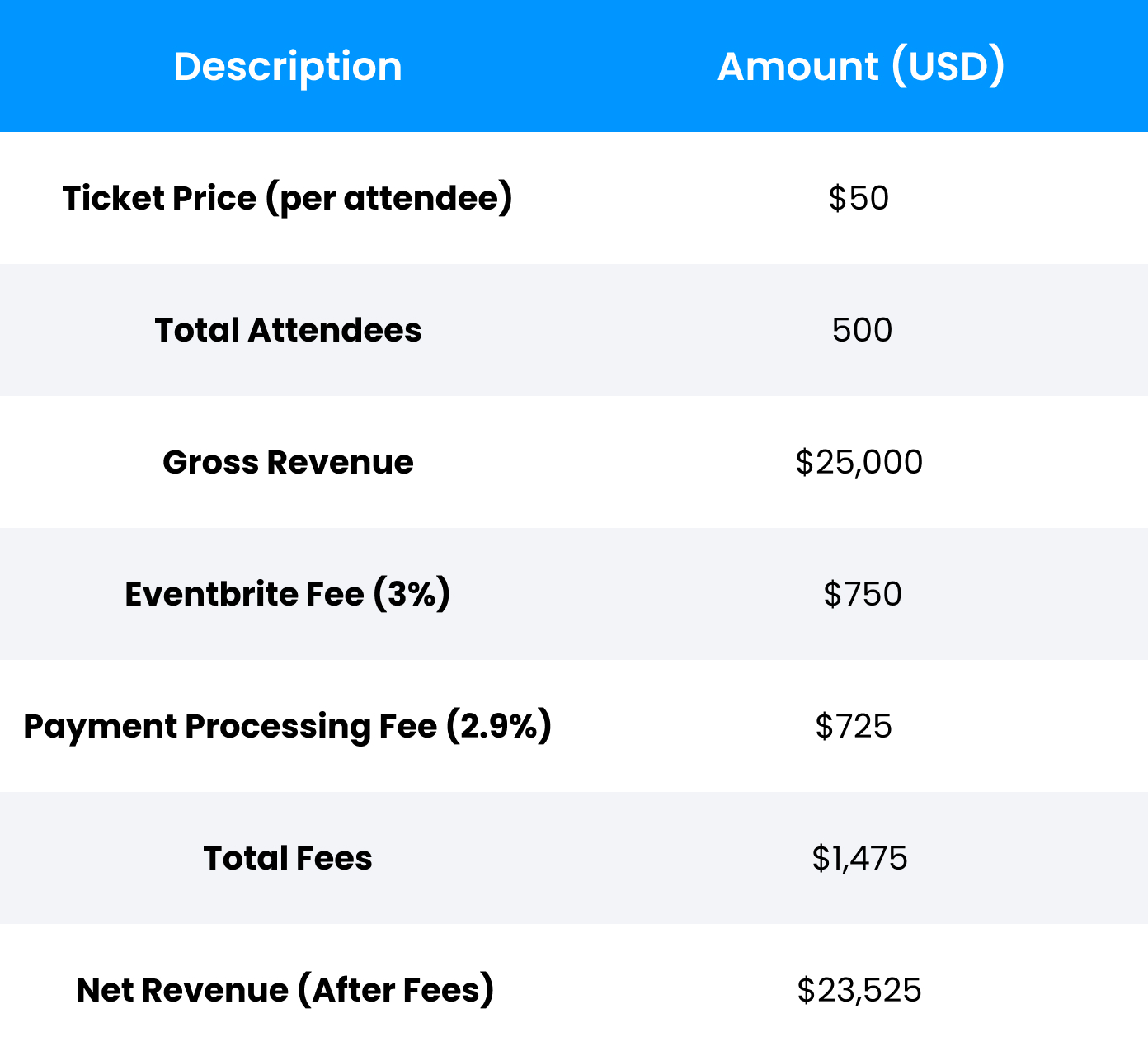
Example Scenario — 500 Attendees Using Paid Tickets
1. Eventbrite Costs (Typical)
- Ticket price: $50 (Per Event Ticket Fee)
- Eventbrite fee: 3%
- Payment processing (Third Part): 2.9% (Fix Charges)
2. WP Event Manager + WordPress Costs
- Hosting: $200 / year
- Premium addons: $300 (optional)
- Payment gateway (Stripe): 2.9% (Fix Charges)
WP Event Manager has two types of costs
1. Fixed / Annual Costs (Paid Once)
- Hosting: $200 / year
- Premium addons: $300 / year (optional)
 Fixed yearly cost = $500
2. Variable / Per-Event Costs
- Stripe payment fee: 2.9% per transaction
- For 500 attendees @ $50
- Stripe fee per event = $725
Correct WP Event Manager Breakdown
1. Per Event
- Stripe fee: $725
- Hosting & add-ons: NOT per event (annual)
2. Yearly Totals
5 Events / Year
- Stripe fees: $725 × 5 = $3,625
- Fixed annual cost: $500
- Total yearly cost: $4,125
10 Events / Year
- Stripe fees: $725 × 10 = $7,250
- Fixed annual cost: $500
- Total yearly cost: $7,750
Note: When the number of events increases, using WP Event Manager becomes more affordable due to the elimination of third-party ticket fees.
WP Event Manager add-on pricing guide
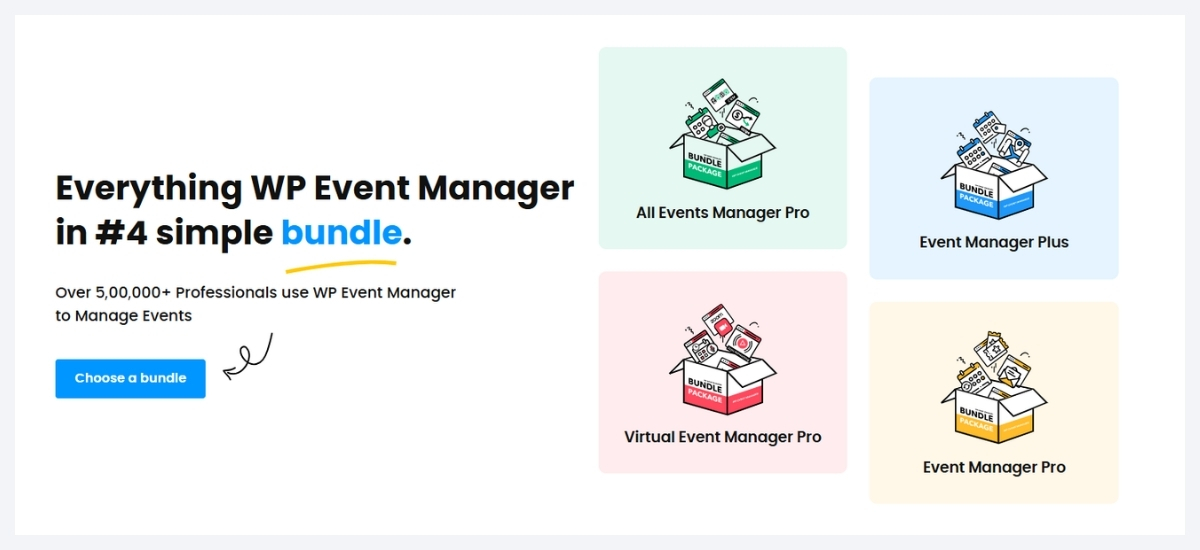
WP Event Manager’s premium bundles are available individually and in bundles. It currently offers four bundles, and each bundle is created for different event management requirements.
Each plugin and bundle comes with a year of subscription along with premium support. The price usually varies based on the number of sites you are purchasing it for. Here, the prices of addons and bundles for one site are displayed.
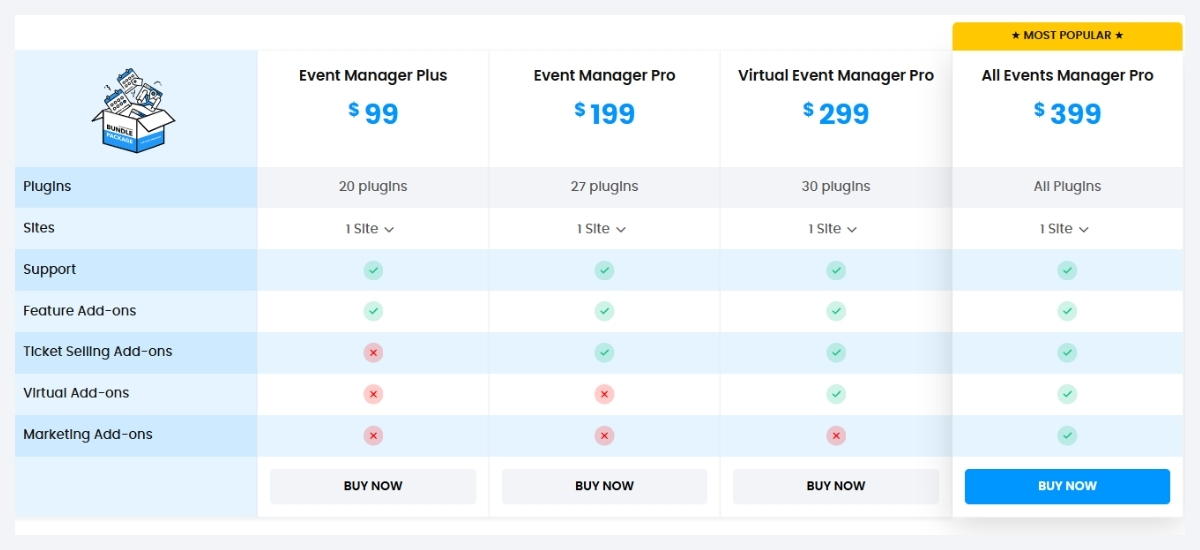
Individual plugin price starts from $49, whereas bundles are available from $99. It is worth mentioning that bundles are a more affordable option than individual plugins as you get multiple ones in a package at a much lesser price.
The pricing structure of WP Event Manager is made considering the purchasing capability of all types of event organizers.
WP Event Manager Demo
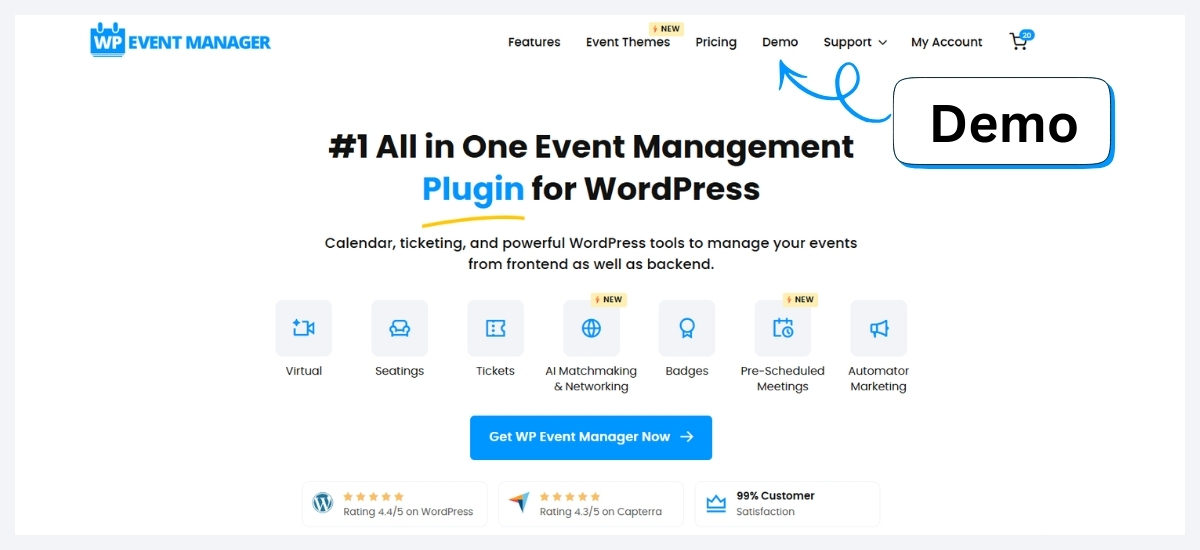
WP Event Manager prioritizes client satisfaction at every stage, ensuring that no client regrets after purchasing the premium plugins. That is why it offers a complete free demo of all its add-ons through which clients get a detailed idea about how the plugins work and what they can expect from them.
Though it does not offer any refund policies but the plugin demo helps users understand the plugin and its usage. All you need to do is to go to the demo option present at the home page of our website, share your email id and follow the steps as instructed over there.
Case study highlights
WP Event Manager has served thousands of customers globally, and their words of appreciation clearly show their satisfaction with our plugin. One of the most prominent clients of WP Event Manager who has been associated with us for more than 7 years now is Vintage land.
We are blessed to have clients like them in our professional journey. Thankfully, we have the support of many such clients like Urban Trendsetters, Cornerstone and more who have always encouraged us to move forward with our ideas.
Wrapping up
When it comes to WordPress event management, WP Event Manager can be the best pick for you. It is versatile, affordable, comprehensive, and a coding-free solution that anybody can use for all types of events. Starting from managing a calendar to registration, ticketing, networking, and promotion, it covers everything you need to manage your events online.
It also offers sophisticated WordPress event themes that are compatible with all its add-ons and other WordPress tools. We hope that this article will help you understand how WP Event Manager works to simplify the online event management process.
The post The Ultimate Guide to WordPress Event Management with WP Event Manager appeared first on WP Event Manager.


0 Commentaires