Creating a mobile ticketing system has become a necessity for every events business because today’s mobile-first generation prefers to do everything using their mobile devices. It simplifies the ticketing process for both event organizers and attendees.
With a mobile ticketing system, attendees can access their event tickets directly from their phones, while organizers can easily track ticket sales and event performance.
If you still don’t have a dedicated ticketing system or ticketing app for your events, you could be missing out on valuable opportunities. But it’s never too late to get started. Read this article to learn how to create a mobile ticketing system for your events.
Before diving into the details, let’s understand what a mobile ticketing system is.
What Is a Mobile Ticketing System?
A mobile ticketing system allows attendees to book event tickets online and organizers to manage ticket sales and access ticket information through their phones. There is no need to print and distribute physical tickets because attendees receive e-tickets in their email inboxes.
At the venue, the QR code on each e-ticket can be scanned from the attendee’s phone. The scan validates the ticket and marks the attendee as checked in.
Why Your Events Need a Mobile Ticketing System
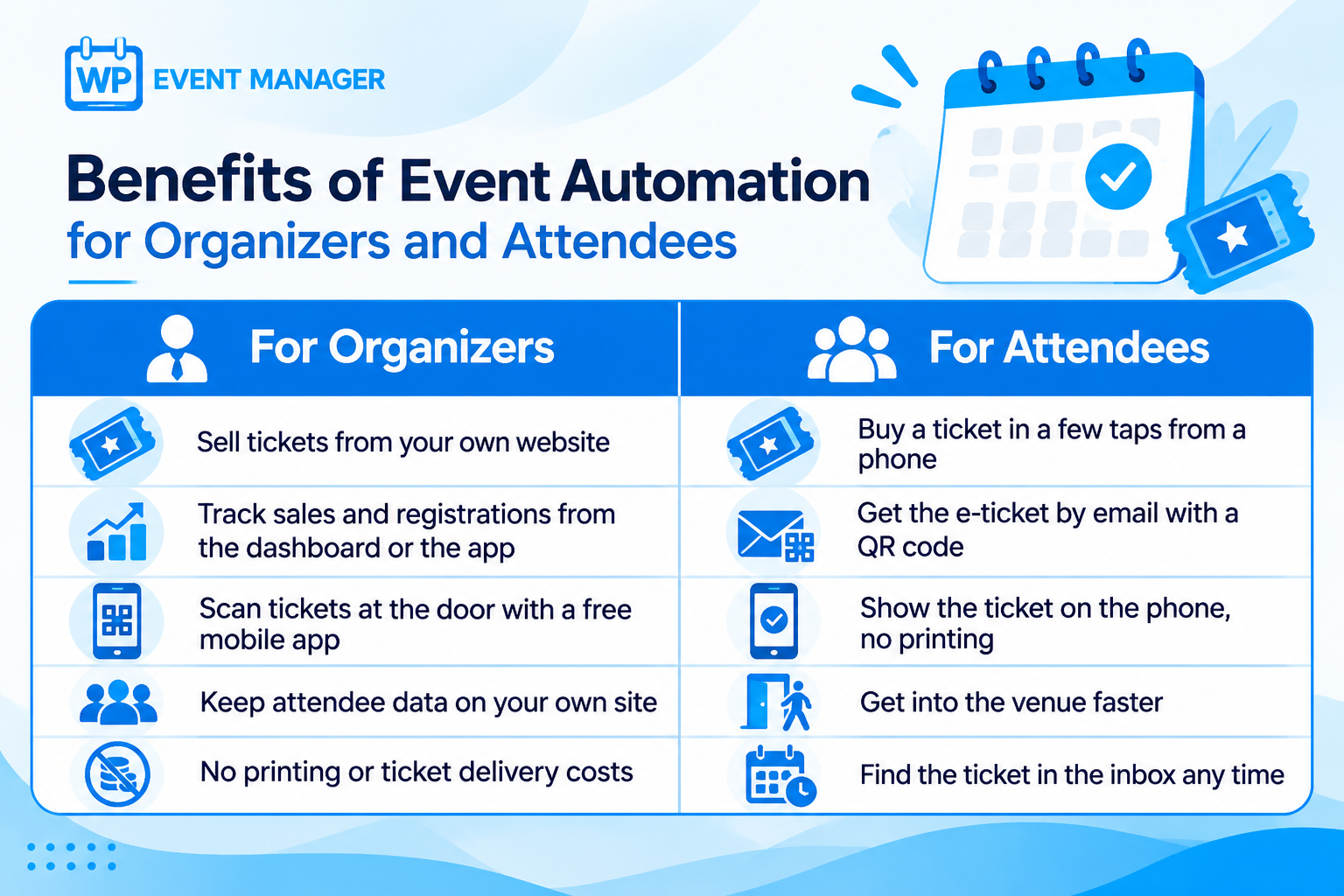
A mobile ticketing system benefits both organizers and attendees. Here’s what it can offer each side:
How to Create a Mobile Ticketing System on WordPress?
To create an efficient ticketing system, you need reliable event management software like WP Event Manager. It is a WordPress event management solution with features designed to simplify event management. More than 30,000 users run their events with it.
WP Event Manager offers 42 premium addons designed to meet different event management requirements, including registrations, ticket sales, and more. WordPress users can use these tools to create an event ticketing system directly on their websites.
When it comes to selling event tickets online, you have two options:
- Hire a third-party ticketing platform.
- Sell tickets directly from your own website.
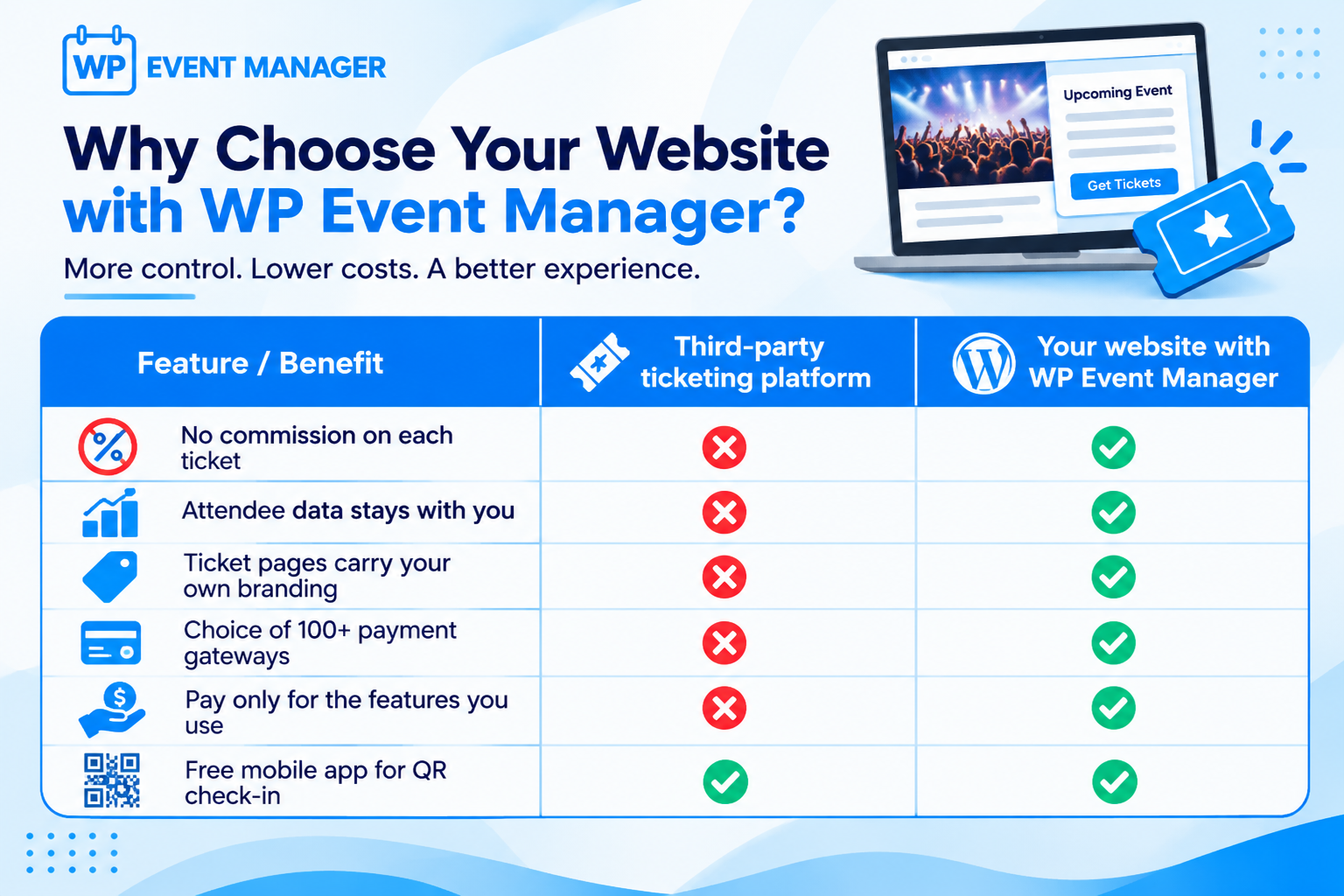
Using a third-party platform can be expensive and may reduce your profits through platform fees or commissions. With dedicated ticketing software, you can manage the entire process on your own website and reduce your reliance on third-party platforms.
Third-Party Platform vs. Your Own Website
Steps to Set Up Your Mobile Ticketing System
To create a mobile ticketing system with WP Event Manager, you need a WordPress events website. Follow these steps:
- Install the free WP Event Manager core plugin.
- Install Woocommerce and configure your preferred payment gateway, such as Stripe or PayPal.
- Purchase the Registrations and Sell Tickets add-on.
- Install and configure the add-ons.
- Create your event and add paid, free, or donation tickets.
- Install the free Rest API plugin and connect the WP Event Manager mobile app to your website.
You’re now ready to sell event tickets through your website.
With WP Event Manager, you can add many other event management features to your WordPress website. You can purchase individual add-ons or choose from available bundles. Ticketing add-ons are included in the following bundles:
- Event Manager Pro.
- Virtual Events Manager Pro.
- All Events Manager Pro.
If ticket selling is your main objective, choose a bundle that includes the ticketing add-ons you need along with other useful features.
WP Event Manager also offers a mobile app for organizers, making event management easier while on the go. Organizers can track their event listings and manage important activities from their phones. The app is free and connects to your website through the free REST API plugin.
How Mobile Check-In Works at Your Event
Every ticket sold through the Sell Tickets add-on includes a QR code. Attendees receive it by email and can open the ticket on their phones at the entrance.
Your staff can open the WP Event Manager app and scan the QR code. The attendee is marked as checked in immediately, and the same ticket cannot be used twice. You can also check attendees out when they leave.
A weak internet connection at the venue doesn’t have to interrupt the process. The app works offline and syncs check-in data once the device is back online. When several staff members scan tickets at different entrances, their devices can stay synchronized.
Don’t want to use the app? You can still check attendees in manually from your WordPress dashboard. However, QR code scanning is available only through the mobile app.
WP Event Manager Add-ons for a Mobile Ticketing System
WP Event Manager offers a range of useful features to simplify event management. It does not require coding skills, making it accessible to users with different levels of technical experience.
To sell tickets and create a mobile ticketing system on your WordPress events website, you’ll need the following WP Event Manager add-ons and tools:
1. Registrations
The Registrations add-on helps you manage attendee registrations through customizable forms and an organized dashboard.
Key features:
- Customizable event registration forms.
- Option to set registration limits.
- Easy attendee data management.
- Ability for administrators to manage attendee statuses.
- Detailed registration dashboard and more.
To learn more about its features, discover the Registrations add-on.
2. Sell Tickets
The Sell Tickets add-on helps you manage ticket sales through WooCommerce and deliver e-tickets to attendees.
Key features:
- WooCommerce integration.
- Easy ticket management.
- Support for three types of event tickets: paid, donation, and free.
- Useful insights into ticket sales.
- Ability to share e-tickets with attendees through email.
- QR codes on mobile tickets for hassle-free check-in.
- Payments through the 100+ gateways supported by WooCommerce.
- No commission from WP Event Manager on your ticket sales.
Sell Tickets works together with the Registrations add-on and WooCommerce, so you’ll need all three to set up this ticketing workflow.
Explore the Sell Tickets add-on to learn more about its features.
3. Event App (Free With the REST API Plugin)
The WP Event Manager mobile app is free to download. It connects to your website through the free REST API plugin, so there is no separate app add-on to purchase.
Some app features rely on other add-ons. For example, check-in requires Registrations, ticket orders require Sell Tickets with WooCommerce, and guest lists and badge printing require the Guest List and Name Badges add-ons.
Key features:
- Track all your events in one place.
- Access ticket and registration details.
- Access and manage attendees.
- Track check-ins and check-outs.
- Choose between dark and light modes.
- Work offline.
- Scan QR codes for quick check-in.
- Sync check-ins across multiple devices.
Discover the WP Event Manager Event App.
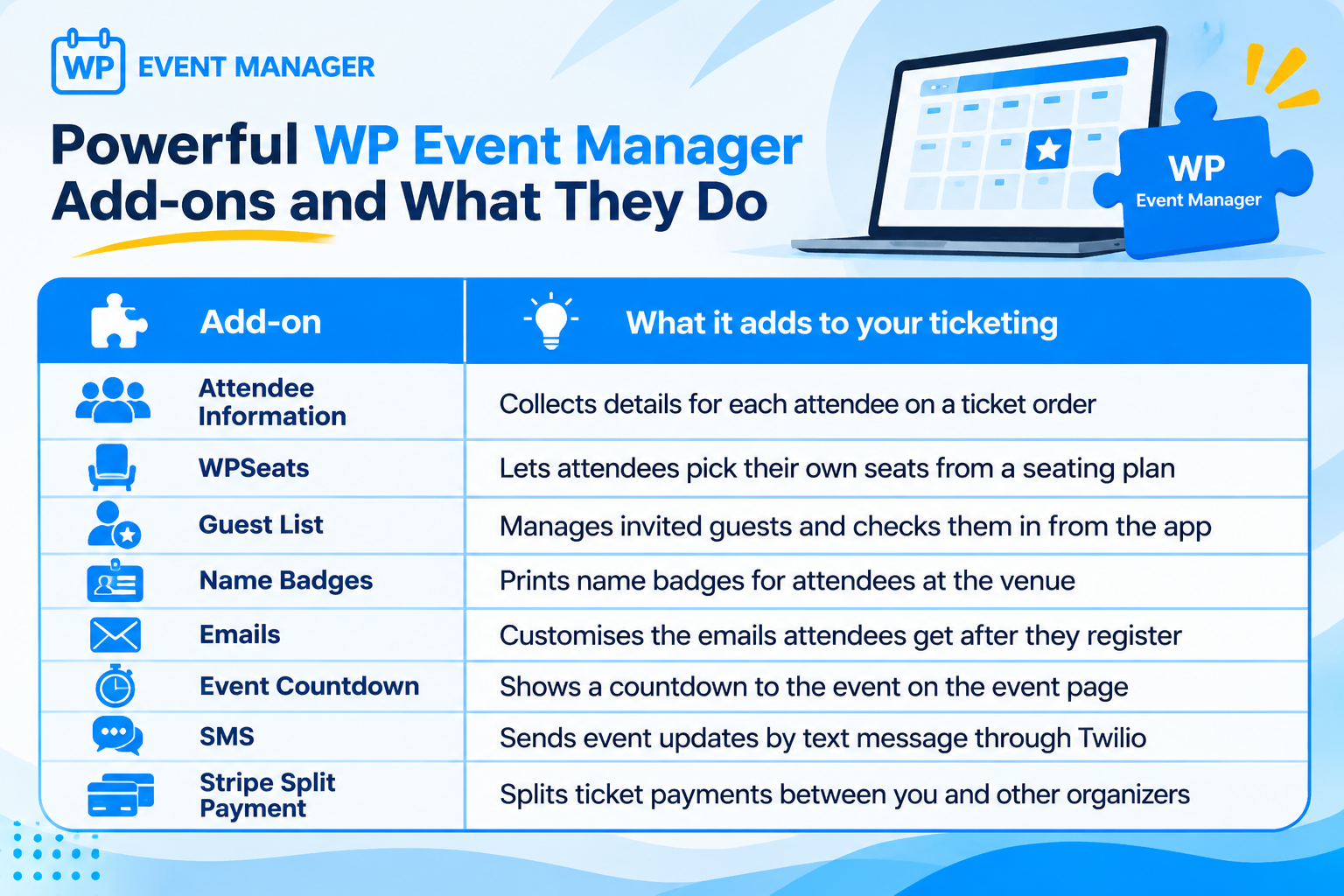
Other Add-ons That Improve Mobile Ticketing
You don’t need these add-ons to start selling tickets. You can add them when your event requirements grow.
Wrapping Up
A good mobile ticketing system can transform the way you manage your events. It benefits both organizers and attendees. You can handle ticket sales more efficiently, while attendees enjoy the convenience of purchasing and accessing tickets from their phones.
This convenient experience can encourage more people to purchase tickets for your events and help strengthen your brand image.
Install WP Event Manager for free, add the Registrations and Sell Tickets add-ons, and start selling mobile tickets directly from your own website.
Frequently Asked Questions
1. What Is a Mobile Ticketing System for Events?
A mobile ticketing system allows organizers to sell event tickets online and deliver them to attendees’ phones. Attendees can purchase, receive, and display their tickets using a mobile device, while organizers manage sales and check people in through their phones.
2. Can I Create a Mobile Ticketing System for Free?
The WP Event Manager core plugin, REST API plugin, and mobile app are all free. However, to sell tickets, you need the paid Registrations and Sell Tickets add-ons. You can purchase them individually or as part of a bundle.
3. Does WP Event Manager Take a Commission on Ticket Sales?
No. WP Event Manager does not charge a commission on your ticket sales. You only pay the standard transaction fees charged by your payment gateway, if applicable.
4. Which Payment Gateways Can I Use?
Sell Tickets works with WooCommerce, so you can use the payment gateways supported by your WooCommerce setup. Stripe and PayPal are two common options.
5. Do Attendees Need to Download an App?
No. Attendees receive their e-tickets by email and can show the QR code directly from their phones. Only organizers and event staff need the mobile app for QR code check-in.
6. How Do I Check In Attendees With QR Codes?
Open the free WP Event Manager mobile app and scan the QR code on the attendee’s ticket. The attendee is then marked as checked in. QR code scanning is available only through the app. You can also check attendees in manually from your WordPress dashboard.
7. Does the Check-In App Work Without Internet?
Yes. The app works offline at the venue and syncs check-in data once your device is back online.
8. Can I Sell Free and Donation Tickets Too?
Yes. The Sell Tickets add-on supports paid, free, and donation tickets. You can offer more than one ticket type for the same event.
The post How to Create a Mobile Ticketing System for Events? appeared first on WP Event Manager.





0 Commentaires